Author: theqoob

  • Free AI Apps in 2026: What ‘Free’ Really Means (and What to Watch For)

    Free AI Apps in 2026: What ‘Free’ Really Means (and What to Watch For)

    Free AI Apps are everywhere now. That sounds great at first. You open an app, type a question, and start getting help right away. But “free” does not always mean full access, no tradeoffs, or no strings attached. In many cases, it means a limited version of a product that is meant to guide you toward paid use later.

    That is why it helps to look closely at what free really includes before you rely on it every day. If you are comparing tools, the best AI apps page is a useful place to start because it helps you think about features, limits, and how the product fits your real needs.

    What “free” usually means in AI Apps

    In most cases, free access means one or more limits are in place. The app may still be useful, but it may not give you the full experience.

    Common free plan limits include:

    • Fewer daily requests
    • Slower response times
    • Limited file uploads
    • Smaller memory or history access
    • Fewer advanced features
    • Watermarks or branding on outputs
    • Restricted support options
    These limits are not always a problem. For light use, a free plan can be enough. But if you depend on the app for daily work, the limits may matter more than the headline price.

    Free is often a trial of the paid product

    Many AI Apps use the free version as an entry point. The goal is to let you test the product before you upgrade. That is not unfair. It is a normal business model. The key is to know that the free tier may not be designed for heavy or long-term use.

    Why free AI Apps can still be useful

    A free plan is not automatically bad. In fact, it can be helpful in several ways.

    Good for testing

    Free access lets you test the interface, the response quality, and the speed before you commit. That is useful when you are comparing tools.

    Good for light tasks

    If you only need an app for short questions, quick drafts, or simple summaries, a free tier may be enough.

    Good for learning

    People new to AI Apps often want a low-risk way to explore. A free plan gives them time to understand what the tool can and cannot do.

    Video https://www.instagram.com/qoobsearch/reel/Dav8v6Ugme8/

    What to watch for before you use a free AI App

    The word “free” can hide important details. Before you trust an app, look at the parts that affect your privacy, your time, and your workflow.

    1. Usage limits

    Some apps let you use the tool a few times a day or a few times an hour. Once you hit the cap, you may need to wait or upgrade.

    This matters if you plan to use the app often. A tool that feels useful on day one may feel too limited by day three.

    2. Feature gaps

    A free plan may leave out the strongest features. That could include longer context, better memory, file support, or advanced search.

    For many users, the app feels good at first because the basics work. The real difference shows up when the job gets more complex.

    3. Data and privacy rules

    This is one of the biggest things to watch. Some free AI Apps collect more usage data than people expect. That may include prompts, activity history, or device details.

    Before you type anything sensitive, check how the app handles your data. The sign-in page can also be a reminder that account access often connects to saved settings, history, and usage patterns.

    4. Ads or upsells

    Some free products use ads or repeated upgrade prompts to support the service. That does not make them unusable, but it can affect the experience.

    If the app keeps interrupting your work, the “free” version may cost you time instead of money.

    5. Output quality differences

    Not all free plans use the same model or the same level of performance. A free version may be slower, less accurate, or less stable than the paid version.

    That is why it helps to test with real tasks, not just simple sample questions.

    A simple way to judge a free AI App

    The best way to evaluate an app is to ask a few practical questions.

    QuestionWhat to checkWhy it matters
    How many times can I use it?Daily or monthly limitsHelps you know if it fits your routine
    What features are blocked?Uploads, memory, speed, exportsShows the real value of the free tier
    What data is collected?Prompts, history, account dataImportant for privacy and trust
    Are there ads or prompts to upgrade?Visual clutter, pop-ups, nudgesAffects ease of use
    Is the output good enough for my task?Accuracy, clarity, speedTells you whether it is actually useful
    This kind of check is simple, but it saves time. It also helps you avoid building a workflow around an app that cannot support it.

    Why free is not always the cheapest option

    A free app can still cost you in other ways. It may cost time, attention, or privacy.

    Time cost

    If the app is slow, has strict limits, or keeps cutting you off, you may spend more time managing the tool than using it.

    Attention cost

    Ads, upgrade banners, and repeated prompts can break your focus. That may not matter for a casual user. It matters a lot if you use AI Apps during work.

    Privacy cost

    If a free tool collects more data than you want to share, the real cost may be control over your information.

    That is why “free” should be read carefully. It is usually a tradeoff, not a gift with no conditions.

    What good free AI Apps should do well

    A strong free plan does not need to do everything. It just needs to do the basics clearly and reliably.

    It should be easy to use

    A good app should not make users work hard just to understand the interface.

    It should give useful answers

    Even with limits, the tool should still provide helpful output for common tasks.

    It should explain its limits

    Users should know what is included and what is not. Clear rules build trust.

    It should respect privacy

    A good app should be honest about data use and give users some control.

    If a free app does these things well, it may be worth using even with limits.

    Where The Qoob fits into this

    The Qoob is built around a more thoughtful search and AI experience, which is why it makes sense to compare it with other AI Apps before choosing one for regular use. The Qoob difference page is useful if you want to understand how the platform is framed and what sets it apart.

    That matters because free AI Apps are easy to try, but not all of them are built for long-term usefulness. A good tool should still feel clear, fast, and practical when the novelty wears off.

    How to test a free AI App the right way

    Do not judge the app with one simple question only. Test it with the kind of work you would actually do.

    Try these kinds of prompts

    • A short everyday question
    • A comparison question
    • A summary request
    • A writing or rewriting task
    • A question with some context
    • A follow-up question after the first answer
    This gives you a better sense of how the app behaves under normal use.

    Watch for repeat problems

    If the app keeps making the same mistakes, that is a sign. If it struggles with context, gets slow, or hides features behind a paywall too quickly, you may want to move on.

    Free AI Apps and long-term use

    The biggest question is not whether a free app works once. It is whether it keeps working well as your needs grow.

    Some people only need basic help, so a free tier is enough. Others need faster access, better memory, or more control. Those users may outgrow the free version quickly.

    That is why it helps to think ahead. A tool that fits today but fails tomorrow is not really a strong choice.

    Questions to ask before you commit

    Use this quick list before making a decision:

    • Is the free version useful on its own?
    • Are the limits reasonable?
    • Can I do my main tasks without upgrading?
    • Am I comfortable with the privacy terms?
    • Is the tool easy to trust and easy to use?
    If the answer to most of these is yes, the app may be worth keeping. If not, it may be better to keep looking.

    FAQ

    What does free mean in AI Apps?
    It usually means limited access. The app may restrict usage, features, speed, or support in the free version.

    Some are, but you should still check the privacy policy, data collection rules, and account settings before using them for anything sensitive.

    Many free products use the free tier to attract users and then offer paid plans for advanced features, more usage, or better performance.

    Yes, for light tasks it can be. If you need advanced features or heavy use, the free version may feel too limited.

    Look at usage limits, feature limits, data policy, and how well the app handles your real tasks.

    Conclusion

    Free AI Apps can be useful, but “free” rarely means unlimited. It usually comes with limits, tradeoffs, and rules you should understand before you rely on the tool. The best choice is not always the one with the lowest price. It is the one that gives you enough value, enough control, and enough clarity to use it with confidence.

    If you are comparing options, start with The Qoob and see how its approach lines up with the kind of AI support you actually need.

  • How to Get Better Answers from AI Search: Prompting Tips for Everyday Questions

    How to Get Better Answers from AI Search: Prompting Tips for Everyday Questions

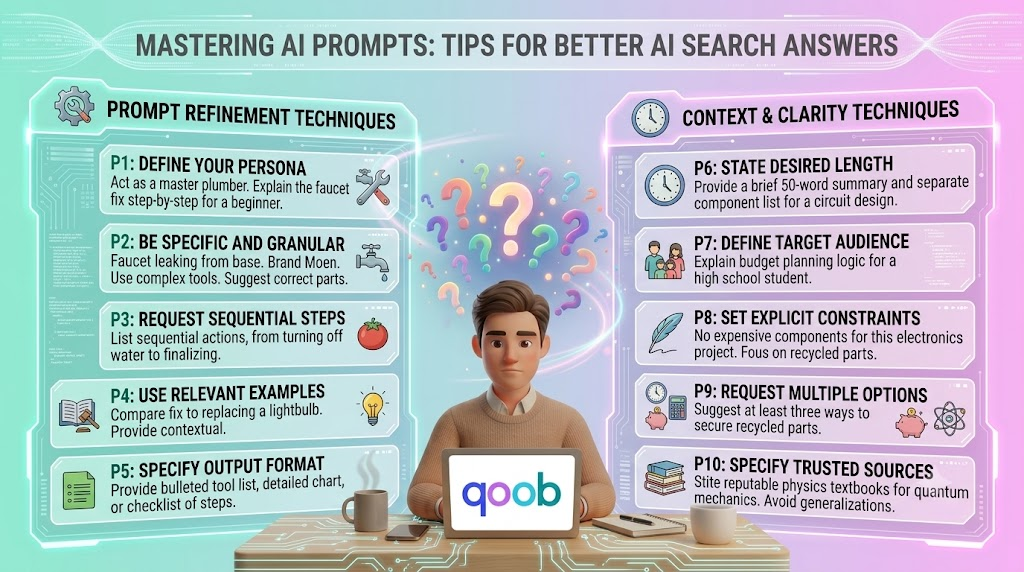
    AI Search can save time, but the quality of the answer depends on the quality of the question. A short, vague prompt often leads to a broad reply. A clear prompt usually leads to a better one. That is why learning how to ask well is one of the most useful skills for everyday search. If you want a more personal search experience, the AI Search approach from The Qoob is worth understanding. It shows how a better search flow can help you move from a simple question to a more useful answer without extra effort.

    Why prompting matters

    Many people think AI search is only about the tool itself. In reality, the prompt does most of the work. The same system can give two very different answers depending on how the question is written. A weak prompt may leave out context, goals, or limits. A strong prompt gives the tool enough information to respond in a useful way. That does not mean writing a long message every time. It means giving the right details.

    The goal is clarity, not complexity

    You do not need technical language. You do not need special formatting. You only need to make the request easier to understand. The best prompts are often short, direct, and specific.

    What makes a better AI Search prompt

    A good prompt usually answers four simple questions:
    • What do you want?
    • What is the topic?
    • What kind of answer do you need?
    • What should the result help you do?
    When those pieces are clear, AI Search can give a more focused answer. That matters for everyday questions because most people are not trying to do deep research every time. They just want a useful next step.

    A simple prompt formula

    A practical way to write prompts is to use this structure: Task + Topic + Context + Output style For example:
    • Explain this in simple language
    • Compare these two options for home use
    • Give me quick steps for fixing this
    • Summarise this for a beginner
    This kind of structure helps AI Search understand the job faster. It also reduces the chance of getting an answer that is too broad or too advanced.

    Everyday prompting tips that improve answers

    The tips below work well for common questions. They are easy to use and do not require special knowledge.

    1. Be specific about the result you want

    Do not just ask what something is. Ask what you need from the answer. For example:
    • Weak: Tell me about email marketing
    • Better: Explain email marketing for a small business owner
    • Better still: Explain email marketing for a small business owner in simple steps
    The more exact the result, the better the reply.

    2. Add the level of detail you want

    Some questions need a short answer. Others need more detail. AI Search works better when you say which one you want. For example:
    • Give me a short summary
    • Explain it in simple terms
    • Give me three practical examples
    • Break it into steps
    This helps the tool match your time and attention level.

    3. Give context when the topic is not obvious

    Context helps AI Search avoid guessing. It also helps the response fit your situation better. For example:
    • I need this for a work email
    • I am new to this topic
    • I want a comparison for personal use
    • I need a quick answer before a meeting
    Even one extra sentence can improve the result.

    4. Ask for the format you want

    Sometimes the answer is fine, but the structure is not. You can fix that by asking for a clear format. For example:
    • Give me a bullet list
    • Show me a table
    • Write it in plain English
    • Summarise the main points first
    Format control is one of the easiest ways to improve results.

    5. Use follow-up questions

    Good AI Search use often happens in two steps. The first answer gives you a starting point. The second question makes it better. For example:
    • Can you make that shorter?
    • Can you explain the second point more clearly?
    • What would this look like in practice?
    • Can you compare that with the other option?
    This back-and-forth is useful because it lets you refine the answer without starting over.

    6. Avoid packed questions

    When one prompt contains too many unrelated things, the answer can become messy. Try to keep one main goal per question. For example:
    • Weak: Compare these tools, explain the differences, and tell me which one is better for a beginner
    • Better: Compare these tools for a beginner
    • Better still: Compare these tools for a beginner and show the differences in a table
    A cleaner prompt gives a cleaner answer. Video : https://www.instagram.com/qoobsearch/reel/DbCLXqND8oY/

    Good and bad prompt examples

    The table below shows how small changes can improve the result.
    Weak prompt Better prompt Why it works better
    Tell me about AI search Explain AI search in simple terms Gives the tool a clear task and tone
    Compare these two tools Compare these two tools for daily use Adds the use case
    How do I do this? Give me step-by-step instructions for this task Makes the format clear
    What is the best one? Which one is better for a beginner and why? Defines the audience
    Help me understand this Summarise this in plain language with one example Improves focus and output style

    How to ask better questions for everyday use

    Everyday questions are usually simple on the surface, but they still benefit from a little structure.

    For quick facts

    Use short prompts like:
    • What does this mean?
    • Why is this happening?
    • What is the difference?
    • What should I know first?
    These work well when you want a fast answer without extra detail.

    For decisions

    When you need help choosing, ask for comparison and reasoning. For example:
    • Which option is better for a small team?
    • What are the pros and cons of each one?
    • Which one is easier to use?
    • Which one saves more time?
    Decision prompts work best when you name the goal.

    For how-to questions

    When asking for steps, say so clearly. For example:
    • Show me the steps
    • Explain the process simply
    • Give me a beginner guide
    • Tell me what to do first
    This helps AI Search avoid giving a summary when you really need instructions.

    For writing help

    AI Search can also improve wording. For example:
    • Rewrite this in plain language
    • Make this sound more professional
    • Shorten this message
    • Make this easier to understand
    These prompts are useful for emails, notes, descriptions, and quick messages.

    How The Qoob supports better search habits

    Good prompting becomes even more useful when the search tool is built around clear, personal use. That is part of The Qoob’s approach. If you want to understand the platform from the ground up, the homepage is a useful place to start. The real value is not only in answering questions. It is in helping users shape better questions and get a result that fits the moment. For a deeper view of how the product is framed, the Why Qoob page gives more context on the thinking behind the platform.

    A simple checklist before you hit enter

    Before you send a prompt, check these points:
    • Is the question specific enough?
    • Did I add the context that matters?
    • Did I say how detailed I want the answer?
    • Did I mention the format I need?
    • Is there a simpler way to ask this?
    This small habit can improve results right away.

    When a better prompt changes the outcome

    A stronger prompt can save time, reduce confusion, and give you a better first answer. That matters most when you are asking about everyday topics that come up often. Think about how often people search for things like:
    • A short explanation
    • A simple comparison
    • A quick next step
    • A better way to phrase something
    • A plain-language summary
    These are the moments when prompt quality makes a real difference. For more background on how search behavior is changing, the article on why AI search is replacing Google for everyday questions gives useful context.

    A few prompt templates you can reuse

    Here are some simple templates you can adapt:
    • Explain [topic] in simple terms
    • Compare [option A] and [option B] for [use case]
    • Give me three steps to solve [problem]
    • Rewrite this message to sound clearer
    • Summarise this for a beginner in plain English
    These templates are useful because they give AI Search a clear job without making the prompt feel complicated.

    FAQ

    What is AI Search?
    AI Search is a way of asking questions that uses artificial intelligence to return direct, useful answers instead of only a list of links.

    Prompts matter because the tool uses your wording to decide what kind of answer to give. Clear prompts usually lead to better results.

    It should be as short as possible while still giving enough context. A few clear words are often enough.

    Yes. Follow-up questions are one of the best ways to improve the first answer and make it more useful.

    Be specific, add context, and say what kind of answer you want. That usually improves the result right away.

    Conclusion

    Better answers from AI Search usually start with better prompts. You do not need to write long instructions. You only need to be clear about what you want, why you want it, and how you want the answer to look. That simple habit can make everyday search faster, easier, and far more useful.

    For users who want a more personal and practical search experience, The Qoob is a relevant place to explore how better search habits can fit into daily work and everyday questions.

  • 10 Everyday Questions You Didn’t Know an AI Search App Could Answer

    10 Everyday Questions You Didn’t Know an AI Search App Could Answer

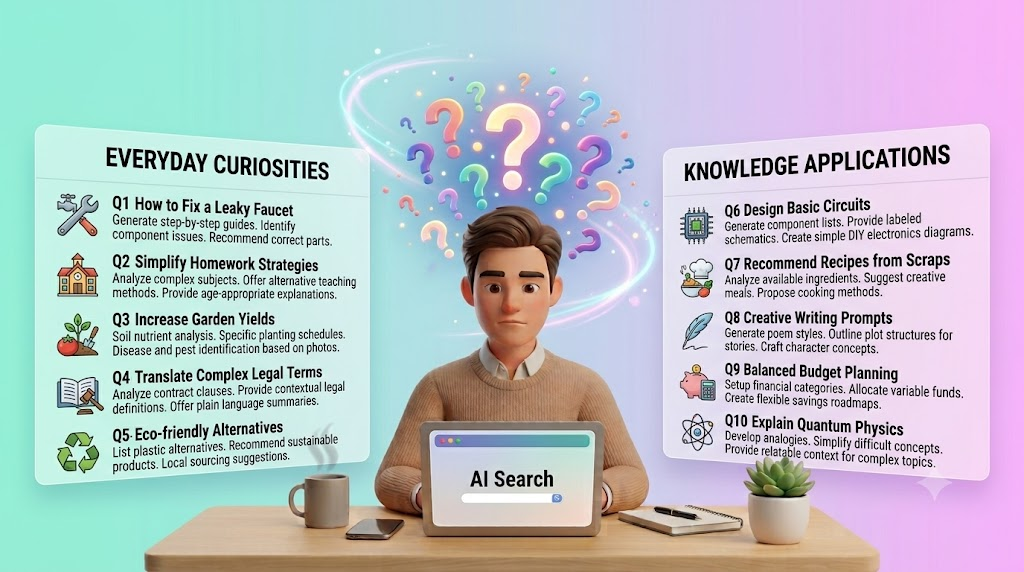
    People often think of search as something they use for big research tasks, complex work questions, or product comparisons. In reality, search tools are used for small daily decisions all the time. That is where a modern AI Search App can be more useful than many people expect. It can help with simple, practical questions that come up during the day and turn them into fast, clear answers.

    The Qoob is designed around a more personal search experience, which makes it a useful example of how search can fit everyday life. If you are comparing how different tools work, the homepage is a good starting point for understanding the broader platform and how it is positioned around search that feels more natural to use.

    Why everyday questions matter

    Not every search starts with a serious project. Many start with a small problem, a basic need, or a quick decision. You may want to compare options, check a detail, or get a simple explanation before you move on with your day.

    That is where AI search feels different from traditional search. Instead of making you sort through many pages, it can help you move from question to answer more directly. For repeated daily use, that speed can matter a lot.

    The value of simple answers

    A good search experience does not need to feel complicated. It should help you save time, reduce confusion, and give you enough context to act with confidence. That is especially useful when the question is small but still important.

    10 everyday questions an AI Search App can answer

    The examples below show how an AI Search App can help with normal day-to-day needs, not just advanced research.

    1. What is the quickest way to explain a topic?

    Many people need a short, simple explanation of something before they can decide what to do next. This may be a concept, a product feature, a process, or even a word they do not fully understand.

    An AI search tool can give a clear summary without making you read through long articles first. That makes it useful for busy users who just need the main point.

    2. How do I compare two things?

    Comparison questions come up all the time. You may want to compare tools, methods, services, or even everyday options like routes, plans, or features.

    AI search can help frame the difference in a more direct way. Instead of scanning multiple sources one by one, you can ask for a side-by-side explanation and get a faster starting point.

    3. What should I do first?

    People often know they have a problem, but not the order of steps to solve it. That is common in work, travel, home tasks, and planning.

    A search app can help break a question into a simple sequence. It can show the first step, the second step, and the next decision to make. That makes it easier to move forward without overthinking.

    4. What does this term mean?

    Many searches begin with a term that sounds familiar but is not fully clear. This could be a technical word, a policy term, a product label, or a business phrase.

    An AI Search App can give a plain-language explanation. That is especially helpful when you want the meaning without getting stuck in jargon.

    5. How do I choose between options?

    People often search when they are stuck between two or three possible choices. The question might be about tools, services, prices, or features.

    Search that supports direct comparison can help users narrow the field faster. The goal is not just to provide information. It is to help the user make a clearer decision.

    6. What is the latest update on this topic?

    Even everyday users need current information. That may include a product change, a policy shift, a service update, or a new way of doing something.

    AI search can help surface recent context faster than a manual search session in some cases. It is useful when you want a quick status check before you move on.

    For a wider discussion of how this style of search is changing daily behavior, the article on why AI search is replacing Google for everyday questions gives helpful background.

    Video : https://www.instagram.com/qoobsearch/reel/DbT4YyLlN-w/

    7. What is the best way to phrase this?

    Sometimes the problem is not the answer. It is the wording. You may need to write a message, a question, or a search query, but you are not sure how to say it.

    An AI search tool can help reframe your idea in simpler language. That saves time and often leads to better results because the query becomes more specific.

    8. What can I do with this information?

    Information is only useful if it leads to action. Many people search because they want to know the next practical step.

    A good AI search experience can move beyond facts and help you think about what to do next. That could be a follow-up question, a comparison, a checklist, or a decision path.

    9. How do I solve a small problem?

    Everyday search is often about small issues that interrupt the day. Maybe something is not working, a process is unclear, or you need a quick fix.

    AI search can help narrow down the likely cause and show a practical next step. That is useful because many small problems do not need a full research session. They just need a clear answer.

    10. What should I remember from this?

    People often search more than once for the same topic because the first answer was too broad. A better AI Search App can help reduce that repeat work by giving a cleaner summary and a stronger takeaway.

    This matters because the best search tools do more than answer a single question. They help users remember what matters and continue the task with less friction.

    Everyday questions and the kind of help they need

    Not all searches need the same response. Some need a short definition. Others need a comparison or a next step. The table below shows how different kinds of questions usually map to different kinds of support.

    Everyday question typeWhat the user needsHow AI search helps
    Definition questionA simple explanationGives a clear summary in plain language
    Comparison questionA direct side-by-side viewHelps sort options faster
    How-to questionStep-by-step guidanceBreaks the task into manageable steps
    Decision questionA practical recommendationHelps narrow the choice
    Update questionRecent informationReduces time spent checking multiple sources
    Rewording questionBetter phrasingHelps create a clearer query or message

    Why this matters for daily use

    The reason AI search is useful in everyday life is simple. Most people do not need a perfect research paper every time they type a question. They need a fast answer they can understand and use.

    It saves time

    When a tool gives a direct answer, users spend less time digging through pages. That matters most when the question is small but repeated often.

    It reduces friction

    A search app that understands natural language can feel easier to use. Users can ask questions the way they actually think, instead of trying to match exact keywords.

    It helps users stay focused

    The more quickly someone gets the right answer, the faster they can return to the task they were already doing. That is a major reason people keep using better search tools once they try them.

    How The Qoob fits into this

    The Qoob focuses on a more personal search experience, which can be useful for people who want search to feel simpler and more direct in daily use. If you want to understand how that experience is structured, the Qoob search page is the most relevant place to look.

    That kind of approach matters because everyday questions are often small, but they still need clear answers. A tool that handles those questions well can become part of a user’s normal routine.

    What makes an AI Search App useful in practice

    A useful search app is not only fast. It is also easy to understand, easy to return to, and good at handling repeated questions without adding confusion.

    Good signs to look for

    • Clear answers
    • Simple language
    • Fast follow-up support
    • Helpful comparisons
    • Easy navigation
    • Consistent results
    When these pieces come together, search becomes less of a task and more of a habit.

    FAQ

    What is an AI Search App?
    An AI Search App is a tool that uses artificial intelligence to answer questions, explain topics, compare options, and help users search in a more natural way.

    Yes. It can help with definitions, comparisons, small decisions, how-to questions, and quick explanations that come up during the day.

    It can be, especially when the user wants a direct answer instead of sorting through many links. The best option depends on the task and the tool design.

    No. Most people can use an AI Search App by typing questions in normal language. That is one of the main benefits.

    Because it saves time and makes answers easier to understand. Small questions are often repeated often, so faster search can make a big difference.

    Conclusion

    An AI Search App is not only for big research jobs. It can also answer the small questions people ask every day, from simple definitions to quick comparisons and next steps. That makes it useful in a way many people do not expect at first.

    If you are comparing tools or want to see how a more personal search experience works, visit The Qoob to explore the platform and see how it fits into everyday search habits.

  • Is AI Search Private? What You Should Know Before You Type Your Next Question

    Is AI Search Private? What You Should Know Before You Type Your Next Question

    AI Search is changing how people find answers. It is faster than regular search, easier to use, and often feels more natural. You type a question and get a direct reply. That is useful. But it also raises a fair question: what happens to the information you type?

    If privacy matters to you, it is worth understanding how AI tools may handle your prompts, your account data, and your activity history. A good place to start is the private AI assistant page, which shows why privacy should be part of the conversation before you trust any search tool with personal or work-related questions.

    Why privacy matters in AI Search

    Search used to feel simple. You typed a query, got results, and moved on. AI Search is different because the tool may process more than just keywords. It may read the full question, the context around it, and sometimes the follow-up questions too.

    That makes the experience helpful, but it also means you should be careful about what you share. A search tool may not be the right place for private notes, business secrets, legal details, health information, or anything you would not want stored or reviewed later.

    The main privacy risk

    The biggest risk is not always a public leak. Often, the issue is data collection. If a tool keeps prompts, account details, or usage logs, that information may be used to improve the product, troubleshoot problems, or personalize the experience.

    That does not automatically make the tool unsafe. It just means you should know the rules before you use it for sensitive work.

    What AI Search may collect

    Different tools collect different types of data. The exact details depend on the product, but common examples include:

    • Your search questions

    • Follow-up prompts

    • Account information

    • Device or browser data

    • Usage patterns

    • Feedback you submit

    Some tools may use this data to improve search quality. Others may use it to keep your sessions synced across devices or to help with support. The important point is to read the privacy terms before you assume anything is private by default.

    Why “private” does not always mean “invisible”

    A tool can still call itself private while keeping some data for service functions. In practice, “private” may mean that your data is not shared publicly, not sold to advertisers, or protected with account controls. That is helpful, but it is not the same as complete secrecy.

    Video Embed : https://www.instagram.com/qoobsearch/reel/DbOhBW6jh3S/

    Questions to ask before you trust an AI Search tool

    Before you use any AI Search product for important work, ask a few simple questions.

    Start with these

    1. Does the tool save my prompts?

    2. Can I delete my history?

    3. Is my data used for training?

    4. Can I control what is stored?

    5. Is the privacy policy easy to understand?

    6. Does the tool offer a business or personal mode?

    These questions help you judge whether the tool fits your comfort level. If the answers are vague, that is a warning sign.

    How privacy affects real search behavior

    People often type more into AI Search than they would into a normal search bar. That is because the exchange feels more personal and conversational. You may explain your goal, your problem, and your situation in one message.

    That is useful, but it also means you should slow down before typing sensitive details. Even a simple question can include information about your company, client, location, budget, or strategy.

    Examples of what to avoid

    You may want to avoid entering:

    • Passwords or login details

    • Private client information

    • Internal business plans

    • Confidential numbers or contracts

    • Medical or legal records

    • Anything tied to another person’s identity

    If the question could create trouble if seen later, it is safer not to type it in full.

    How to use AI Search more safely

    You do not need to stop using AI Search. You just need better habits.

    Safer ways to search

    • Use broad questions instead of exact private details

    • Remove names, account numbers, and sensitive files

    • Check whether the tool has a history or memory feature

    • Log out after use on shared devices

    • Review privacy and data settings

    • Delete old searches when the tool allows it

    These steps are simple, but they reduce risk fast. They also help you keep better control over what data the tool can see.

    The difference between search privacy and account privacy

    These two things are related, but they are not the same.

    Search privacy is about what happens to the question you type and the answers you get. Account privacy is about your login, profile, saved preferences, and activity history.

    A tool may protect your account well but still store search prompts for service reasons. Another tool may limit prompt storage but still collect technical data from your device. That is why it helps to look at the whole picture.

    What matters most

    If you only remember one thing, remember this: privacy is not one switch. It is a set of rules. Those rules can cover storage, sharing, training, history, and deletion. The better you understand them, the safer your search habits become.

    Why personal search tools should be reviewed carefully

    Some AI tools are built around personal search. That can make them useful, but it can also make them more sensitive. A personal system may know more about your habits, your topics, and your past questions. That can improve the experience, but it also increases the amount of information the tool may handle.

    For a broader view of how this fits into the search experience, the personal AI search guide 2026 is a helpful reference. It explains how personal search is changing the way people find and use information.

    What to check in the privacy policy

    Privacy policies are often long, but you do not need to read every line to get the main idea. Focus on the parts that answer the most important questions.

    Look for these sections

    • What data is collected

    • How long data is kept

    • Whether data is used for training

    • Whether data is shared with third parties

    • How users can delete data

    • Whether different plans have different privacy rules

    If a company makes these points clear, that is a positive sign. If the policy is hard to understand or hides key details, be cautious.

    How companies should think about AI Search privacy

    For businesses, privacy matters even more. Employees may use AI Search for research, writing, planning, or support. That can save time, but it also creates risk if people paste sensitive information into tools without thinking.

    A simple internal rule can help. Ask staff to avoid entering confidential data unless the tool is approved for that purpose. That one habit can prevent many problems later.

    Good team habits

    • Set clear rules for what can be searched

    • Train people on safe prompt writing

    • Use approved tools for sensitive work

    • Review privacy settings regularly

    • Keep work and personal search separate

    These habits are easy to apply and can reduce risk without slowing people down too much.

    How The Qoob frames private AI search

    The Qoob focuses on a more privacy-aware search experience, which makes it relevant for people who want more control over their questions and results. If privacy is a major concern, it is worth understanding how the Qoob search experience is positioned and what kind of search flow it supports.

    The real question is not whether AI Search is useful. It is whether the tool gives you enough control to use it with confidence.

    When to be extra careful

    Some searches deserve more caution than others.

    High-risk topics

    • Health questions with personal details

    • Legal issues involving names or documents

    • Financial questions with account data

    • Client work that is not public

    • Internal business strategy

    • Personal identity or private life details

    In these cases, use the tool carefully or avoid entering the sensitive parts entirely. A general question is safer than a detailed one.

    A simple privacy checklist

    Before you type your next question, pause and check these points:

    • Is the topic sensitive?

    • Does the tool store history?

    • Can I delete or limit data sharing?

    • Am I using a trusted account?

    • Would I be comfortable seeing this prompt again later?

    If the answer to any of these is unclear, it is worth slowing down.

    FAQ

    Is AI Search private by default?
    Not always. Some tools store prompts, usage data, or account history. You should check the privacy settings and policy of each tool you use.

    Yes, some tools can. Others may allow you to turn history off or delete old prompts. The exact setup depends on the product.

    It is usually better not to enter sensitive personal information unless you trust the tool and understand how it handles data.

    Use broad questions, avoid private details, review privacy settings, and delete history when possible. Shared devices need extra care.

    Look at what data is collected, how long it is stored, whether it is used for training, and whether you can control or delete it.

    Conclusion

    AI Search is useful, but privacy should come first. Before you type your next question, think about what the tool may collect, how long it may keep it, and whether you are comfortable with that. Small habits like avoiding sensitive details and checking settings can make a big difference.

    If you want to understand privacy-focused search in more detail, The Qoob provides a useful starting point. You can learn more and compare options through The Qoob if you are reviewing how private AI search fits your workflow.

  • Qoob vs. Perplexity: Which AI Search Tool Is Right for You?

    Qoob vs. Perplexity: Which AI Search Tool Is Right for You?

    Choosing an AI Search Tool is no longer just about finding answers quickly. It is also about how those answers fit into your workflow, how easy they are to trust, and whether the tool helps you move from search to action without extra effort. For some users, that means a broad conversational search engine. For others, it means a more personal research experience built around their own needs.

    The Qoob positions itself around personal AI search, which makes it a useful option to evaluate if you want search that feels more tailored to your day-to-day work. You can start by looking at the AI search tool offering and then comparing it with Perplexity based on how each one handles discovery, organisation, and follow-up research.

    What each tool is trying to solve

    At a basic level, both tools aim to make searching faster and more useful than a traditional search bar. The difference is in how they organise that experience.

    Perplexity is generally used as a conversational search tool that helps users ask questions and receive summaries, sources, and follow-up paths in one place. The Qoob, on the other hand, is framed more around personal AI search, which suggests a more focused experience for users who want search to support their own information habits.

    That difference matters because the best tool is not always the one with the widest reach. It is often the one that matches the way you actually work.

    The main decision point

    If you need a general-purpose research companion, you may lean toward a tool designed for broad exploration. If you want search that feels more personalised and aligned with your own information needs, The Qoob may be the better fit.

    How to compare AI search tools in a practical way

    The easiest way to compare tools is to ignore the buzzwords and look at use case, output quality, and workflow fit.

    Ask these questions before choosing

    • Does the tool help me get answers faster?
    • Does it reduce the number of steps between question and decision?
    • Can I use it for recurring research tasks?
    • Does it help me organise what I find?
    • Does it fit the way I already work?
    These questions are more useful than comparing labels alone. A tool can sound advanced and still be awkward in practice if it does not support your daily process.

    Video Embed : https://www.instagram.com/qoobsearch/reel/DbMQ1J6mWl7/

    Qoob vs. Perplexity at a glance

    The table below gives a simple comparison based on typical user needs rather than hype.

    CategoryThe QoobPerplexityWhat it means for you
    Search stylePersonal AI search focusConversational AI search focusOne may feel more tailored, the other more broad
    Best forUsers wanting a more individual search experienceUsers wanting general research and explorationDepends on how personal your workflow is
    Research flowMay suit repeat use and focused discoveryMay suit open-ended question answeringUseful for different kinds of tasks
    Learning curveOften best when the user wants a simple routineOften intuitive for broad search questionsEase of use matters when search is frequent
    Output useUseful when search needs to support personal workflowUseful when answers need quick context and sourcesThe right choice depends on your research habits
    Product fitFocused on personal search needsFocused on wider search use casesCompare based on what you need most often
    This kind of comparison helps because many people do not actually need every feature an AI tool offers. They need one tool that works well for the kind of search they do most often.

    When The Qoob may be the better choice

    The Qoob may appeal to users who want a more personal approach to search. That can matter if your work involves repeated research, topic tracking, or a workflow where information needs to feel easier to return to.

    Good fit for repeat research

    If you search around similar topics often, a personal AI search experience can save time. Instead of starting from scratch every time, the tool may support a more consistent way of retrieving and using information.

    Good fit for structured thinking

    Some users do not just want answers. They want a search experience that helps them think through a topic in a more organised way. That is where The Qoob’s positioning around personal search may be valuable.

    You can also read more about the product approach on the Why Qoob page, which helps explain the thinking behind the platform in broader terms.

    When Perplexity may be the better choice

    Perplexity is often attractive to users who want quick conversational search with a wider exploration style. That can be useful when the goal is to scan a topic, compare ideas, or ask follow-up questions in a natural way.

    Good fit for broad discovery

    If you are researching a new subject and need fast context, Perplexity’s style can feel efficient. It works well for users who are still shaping the question as they search.

    Good fit for short, direct tasks

    For one-off questions, users often want a clean answer with enough context to keep going. In that setting, a general AI search experience can be more than enough.

    Why workflow matters more than branding

    A lot of AI products sound similar at first. They all promise speed, clarity, and smarter search. But the tool that wins in real use is usually the one that fits the user’s habits.

    Consider how you actually search

    Some people search in short bursts. Others revisit the same themes over and over. Some users need broad exploration, while others need a more personal system for keeping research manageable. That is why choosing an AI Search Tool should start with workflow, not marketing.

    Think about what success looks like

    A good tool should make your research easier to repeat, easier to understand, and easier to act on. If it only gives you a fast answer but does not support the rest of your process, it may not be the right long-term fit.

    Where The Qoob stands out as a concept

    The Qoob’s value is not just in answering questions. It is in the idea that search should support a more personal and structured way of working. That makes it relevant for users who want something beyond a generic query-response experience.

    If you are trying to understand how this differs from conventional search, the article on AI search vs traditional search is a helpful companion piece. It gives more context for why these tools matter in the first place.

    Better search is not always more search

    One of the biggest mistakes people make is assuming that more features automatically mean better results. In reality, the better tool is the one that gives you useful information with less friction.

    For some users, that will be The Qoob. For others, it may be Perplexity. The point is not to pick the most popular name. It is to pick the one that matches your work style.

    A simple way to decide

    Use this quick breakdown:

    Choose The Qoob if you want

    • A personal AI search experience
    • A tool that supports repeat research
    • A more organised way to handle information
    • Search that feels closer to your own workflow

    Choose Perplexity if you want

    • Broad topic exploration
    • Conversational question answering
    • Quick research across many subjects
    • A familiar general-purpose AI search format
    This kind of decision is usually easier when you focus on the tasks you do most often. A tool that feels perfect in one scenario may be less useful in another.

    The role of onboarding and adoption

    Even a strong tool can be ignored if it feels hard to adopt. That is why onboarding, clarity, and first-time experience matter.

    If a search tool is too complex, people stop using it. If it is too shallow, they outgrow it quickly. The sweet spot is a tool that feels simple at the start but still useful over time.

    That is one reason many users evaluate AI search through a practical lens rather than a technical one. They want to know whether it will become part of their routine.

    Table of real-world use cases

    Use caseBetter fitWhy
    Ongoing personal researchThe QoobA personal search model can support repeat use
    Broad topic discoveryPerplexityConversational search is useful for exploration
    Comparing many ideas quicklyPerplexityIt is often suited to open-ended questioning
    Building a search routineThe QoobA more personal approach can feel easier to repeat
    Learning a new topicPerplexityFast context and follow-up questions help with early research
    Managing recurring information needsThe QoobPersonal search is better aligned with repeat workflows

    FAQ

    What is an AI Search Tool?
    An AI Search Tool uses artificial intelligence to help users find, summarise, and explore information in a more conversational or structured way than traditional search.

    No. They are different tools with different positioning. The Qoob is framed around personal AI search, while Perplexity is usually used for broader conversational search.

    That depends on your workflow. If you want a more personal search experience, The Qoob may be the better fit. If you want broad exploration, Perplexity may be more useful.

    Because a tool only becomes valuable when you actually use it regularly. The best AI Search Tool is the one that fits your habits, not just the one that sounds impressive.

    Some users do. Using both can make sense if your research needs vary, but most people are better off choosing the one that matches their most common tasks.

    Conclusion

    The best AI Search Tool is not always the one with the biggest name. It is the one that helps you search in a way that feels natural, efficient, and repeatable. Perplexity is a strong option for broad conversational research, while The Qoob is positioned around a more personal search experience that may suit users who want a tighter fit with their workflow.

    If you are still comparing options, it helps to look at both the product model and the daily task it is meant to support. For a deeper look at the platform and next steps, visit The Qoob and compare it with the kind of search experience you actually need.

  • AI Search vs. Traditional Search: What’s Actually Different?

    AI Search vs. Traditional Search: What’s Actually Different?

    Search has changed a lot, even if the old habits have not. People still type a question, hit enter, and expect a useful answer. The difference is that the system behind the answer now works in a very different way. That shift matters when the question is simple, when the topic is messy, and when the user does not want to spend twenty minutes sorting through tabs like a lost intern with a browser addiction.

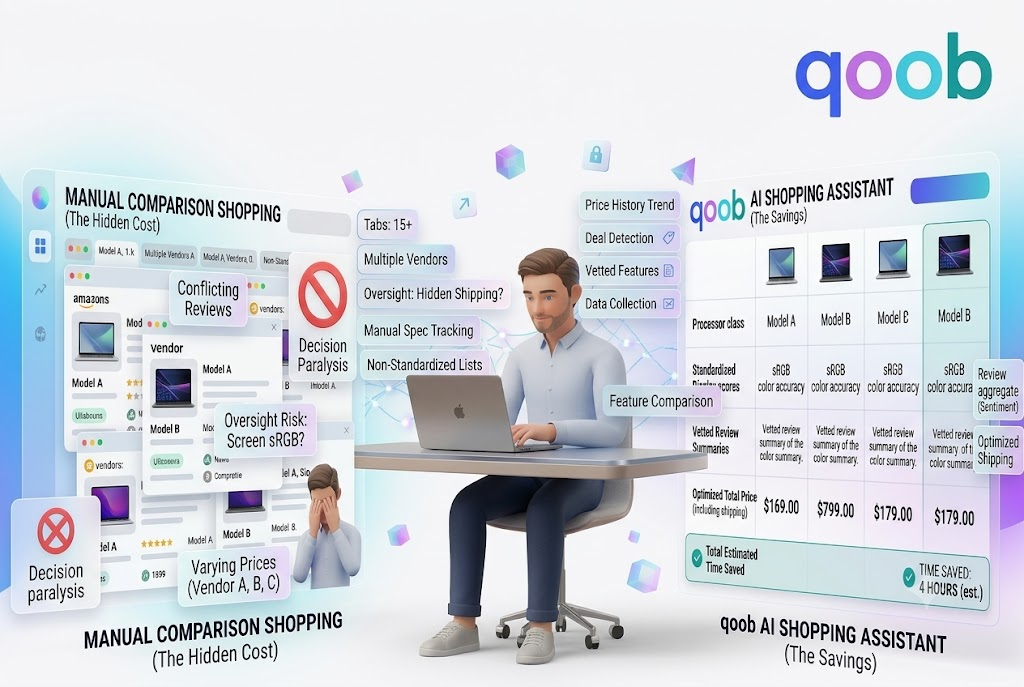
    If you are trying to understand AI Search, the easiest way to think about it is this: traditional search gives you places to look, while AI Search tries to give you the answer itself. That sounds small, but it changes almost everything about how people find, compare, and use information.

    Why people are noticing the difference

    Traditional search has been useful for years because it does one thing well. It finds pages that match words. That works fine when you already know what you want or when the topic is narrow. It works less well when you need a direct answer, a comparison, or a recommendation that depends on context.

    AI Search changes the experience because it tries to understand intent. Instead of only matching keywords, it looks at meaning, phrasing, and the situation behind the question. That makes it easier to get an answer that feels useful right away.

    The real difference is the output

    Traditional search points you to sources. AI Search can summarize those sources, connect them, and narrow the result into something easier to use. In practice, that saves time. It also cuts down on the back-and-forth of clicking, opening, closing, and trying again.

    How traditional search works

    Traditional search is built around indexing web pages and ranking them based on signals such as keywords, links, authority, freshness, and relevance. It does a solid job when the query is specific and the available pages are strong.

    What it does well

    Traditional search is good for:

    • Finding a known website
    • Looking up official pages
    • Checking recent news
    • Comparing source material
    • Discovering a wide range of pages on one topic

    Where it struggles

    It becomes less efficient when users want:

    • A direct answer
    • A comparison of options
    • A recommendation based on context
    • Help deciding between similar choices
    • A summary that removes noise

    That gap is why many users now look for more focused tools instead of just using a general search engine for everything.

    How AI Search works differently

    AI Search does more than match words. It tries to understand the intent behind the request and then organize the answer around that intent. In other words, it is closer to a guided assistant than a list of links.

    It focuses on meaning, not just keywords

    A traditional search engine may show results because they contain the right phrase. AI Search can often tell whether the user wants an explanation, a comparison, a recommendation, or a short answer.

    That matters because many searches are not really searches. They are decisions disguised as questions.

    It can connect information faster

    Instead of making the user read ten pages, AI Search can synthesize information into one response. That means the user spends less time collecting facts and more time using them.

    For a closer look at how this works in practice, QOOB Search shows how a more focused search experience can reduce the amount of manual browsing needed to get to a useful answer.

    Table: AI Search vs. Traditional Search

    Feature Traditional Search AI Search
    Main goal Find matching pages Deliver a useful answer
    Best for Browsing sources Understanding intent
    Result format List of links Summary or response
    User effort Higher Lower
    Context awareness Limited Stronger
    Decision support Weak Better
    Comparison help Manual Faster
    Use case fit General discovery Questions, comparisons, decisions

    This is the core shift. Traditional search helps you look. AI Search helps you decide.

    Why this matters for everyday questions

    Most people do not search the web because they want a history lesson in page rank theory. They search because they need help now. They want to know what to buy, where to go, what to cook, how to compare options, or what problem to solve next.

    AI Search is better for decision-heavy questions

    When the question requires judgment, not just facts, AI Search usually feels more helpful. For example:

    • Which product fits my needs?
    • What is the difference between these two options?
    • What should I do first?
    • What answer applies to my situation?

    Those are not simple lookup tasks. They are decision tasks. That is where AI Search tends to outperform older search patterns.

    Traditional search still has a place

    Traditional search is not dead. Far from it. It still matters for:

    • Official websites
    • Research
    • Timely updates
    • Shopping comparisons
    • Deep source checking

    The point is not that one system replaces the other in every case. The point is that they solve different problems.

    Why context matters so much

    Context is the biggest advantage AI Search has. A question means more when the system knows the situation around it.

    For example, the phrase “best laptop” means something different for:

    • A student
    • A gamer
    • A designer
    • An office worker
    • A traveler

    Traditional search often treats the phrase the same way for all of them. AI Search can adjust the answer based on the likely need. That creates a better result with less effort from the user.

    Personalization changes the experience

    This is where search begins to feel more useful. A more personalized system does not just return data. It returns data that fits the user’s purpose.

    That is one reason people look at personal AI search as a better fit for modern decision-making. It reduces friction by narrowing the answer to the situation, not just the query.

    What users notice first

    Most users do not care about the technical model behind the search. They care about the result.

    Faster answers

    AI Search often gives the answer in a form that is easier to read right away.

    Less scrolling

    Instead of digging through pages, users can get a shorter path to the answer.

    Better comparisons

    It is easier to compare products, places, or ideas when the system organizes the differences for you.

    Fewer dead ends

    Traditional search can lead to irrelevant pages that waste time. AI Search reduces that problem by staying closer to the user’s intent.

    When AI Search is especially useful

    AI Search is strongest when the task requires interpretation.

    Good examples include:

    • Choosing between products
    • Summarizing a topic
    • Finding a quick explanation
    • Comparing options
    • Planning a trip
    • Deciding what to do next

    In each case, the user is not just looking for raw information. They want a filtered answer.

    Where traditional search still wins

    It would be foolish to pretend the older system has no value. Humans do love forcing one tool to replace another just because it sounds neat.

    Traditional search still works well when:

    • You need original source material
    • You want exact website pages
    • You need current updates from multiple publishers
    • You are doing research that needs verification
    • You want to explore a broad topic from the ground up

    That is why the future is likely not one tool replacing the other. It is a mix of both, used at the right moment.

    The shift in user behavior

    More people are moving toward systems that answer questions directly because time matters. They do not want to interpret ten blue links every time they ask a simple question. They want the search experience to fit the task.

    Search is becoming more task-based

    Instead of asking, “What pages mention this phrase?” people are asking:

    • What should I choose?
    • What is the difference?
    • What is the best option?
    • What should I do next?

    AI Search matches that behavior much better than older search models.

    This changes how websites should think

    Sites no longer just compete for rankings. They also compete for clarity, usefulness, and answer quality. Content that helps users quickly will matter more than content that simply repeats keywords.

    For a broader view of this shift, AI search tools are becoming more important because they reduce the gap between question and answer.

    A simple way to choose the right search method

    Use traditional search when you need:

    • Sources
    • News
    • Official pages
    • Broad exploration

    Use AI Search when you need:

    • A direct answer
    • A comparison
    • A recommendation
    • A summary
    • Context-aware guidance

    That simple split helps people choose the right tool faster.

    Conclusion

    AI Search and traditional search are not the same tool with a new label. They solve different problems. Traditional search is built for finding pages. AI Search is built for understanding questions and giving faster, more useful answers.

    That difference matters most when the user needs help deciding, comparing, or acting quickly. If the goal is less scrolling and more clarity, AI Search has the edge. To see how that works in practice, visit QOOB and explore a more focused way to search.


    FAQ

    1. What is the main difference between AI Search and traditional search?

    Traditional search returns pages that match keywords. AI Search tries to understand the meaning of the question and give a more direct answer.

    2. Is AI Search replacing traditional search?

    Not completely. Traditional search still matters for sources, news, and broad discovery. AI Search is better for context, summaries, and decision-making.

    3. Why is AI Search better for everyday questions?

    It reduces the amount of time spent scrolling and comparing. It gives a faster answer when the user wants help deciding something.

    4. Does traditional search still matter?

    Yes. It is still useful when you need original pages, current news, or detailed source checking.

    5. How does context improve search results?

    Context helps the system understand what the user really wants. That leads to more relevant answers and fewer irrelevant results.

  • How to Choose Where to Go This Weekend Without the Endless Scrolling

    How to Choose Where to Go This Weekend Without the Endless Scrolling

    Weekend planning should be simple. In reality, it turns into an exhausting loop of tabs, maps, reviews, reels, and half-finished ideas. You start with one clear goal, then somehow end up with twenty places and no decision. That is the modern travel problem in a nutshell.

    If you are trying to figure out Where to Go this weekend, the answer usually comes from narrowing the choice, not collecting more of them. The best option is not the one with the most reviews or the longest list of attractions. It is the one that fits your time, budget, energy, and the kind of weekend you actually want.

    Why weekend planning feels harder than it should

    People often think the problem is lack of options. It is usually the opposite. There are too many places to compare, and most of them look decent at first glance. That makes the decision feel important even when it is just a weekend plan.

    The result is endless scrolling. You check one site, then another, then a few social posts, then back to the first site because now nothing feels clear. By the time you pick a place, the weekend already feels less relaxing than the actual trip.

    Too many choices create decision fatigue

    Every extra option adds mental work. Once the brain starts comparing nearly identical choices, it gets tired fast. That tiredness makes people delay the decision or settle for the easiest option rather than the best one.

    This is why a simpler process works better than trying to evaluate everything at once.

    Start with the kind of weekend you want

    Before you search for places, decide what kind of weekend you are actually after. That single step removes a lot of confusion.

    Ask what you want from the trip

    Are you looking for:

    • A quiet break
    • A family day out
    • A food-focused trip
    • Something outdoorsy
    • A short overnight escape
    • A low-cost local outing

    Once you know the goal, the list of possible places gets much smaller. A beach trip, a museum visit, and a mountain drive may all sound nice in theory, but they do not serve the same purpose.

    Match the plan to your energy level

    A good weekend plan should fit how much effort you want to spend.

    If you feel tired, choose something simple. If you want a full day out, choose something with more to do. If you only have half a day, do not plan like you have a full one.

    That sounds obvious, but people ignore it constantly and then wonder why the trip feels rushed.

    Use your time as the first filter

    Time is one of the easiest ways to narrow your options. A trip that takes too long to reach may not be worth it for a short weekend. A nearby destination may be better if you only have a day or two.

    Decide how far you want to go

    Think in terms of travel time, not just distance.

    Available TimeBest Type of Trip
    Half dayLocal park, market, nearby cafe, short event
    One dayCity visit, beach town, scenic drive
    One nightSmall getaway, nature stay, food trip
    Two daysMore relaxed weekend trip, major attraction, nearby region

    This simple filter stops you from wasting time on places that look good but do not fit your schedule.

    Build the decision around your budget

    Budget shapes the trip more than people admit. A place may look perfect until you add up transport, food, tickets, parking, and a hotel.

    Think in categories, not guesses

    Estimate these costs:

    • Travel
    • Stay
    • Meals
    • Entry fees
    • Parking or local transport
    • Extra spending

    Once you know the rough total, it becomes easier to rule out places that would stretch the weekend too far. This keeps the plan realistic instead of aspirational.

    Expensive is not always better

    A more expensive destination does not automatically deliver a better weekend. Sometimes a nearby place with good food, a walkable area, and one or two things to do is more satisfying than a pricey trip packed with stress.

    That is one reason smarter planning tools are useful. They help people compare choices with context instead of guessing based on marketing or popularity. For a broader look at search and planning behavior, QOOB Search shows how faster answers can reduce the time spent browsing.

    Think about what kind of experience you want

    Two people can visit the same place and have completely different weekends. That is because the trip experience matters as much as the destination.

    Choose by activity style

    Some people want to relax. Others want to explore. Others want food, shopping, or outdoor time.

    Here are a few simple categories:

    • Relaxing: spa, beach, cabin, quiet town
    • Active: hiking, cycling, walking tours
    • Social: city stay, live music, food district
    • Family-friendly: zoo, park, museum, aquarium
    • Low-effort: local staycation, cafe hopping, short scenic drive

    Once the activity style is clear, you do not need to compare every possible destination. You only compare the ones that match the experience.

    Compare only a few good options

    The fastest way to choose is not to look at everything. It is to look at three or four strong options and compare them directly.

    Use the same criteria every time

    Compare each place using the same questions:

    • How long will it take to get there?
    • What will it cost?
    • What can we do there?
    • Does it match our energy level?
    • Does it fit the weather?
    • Is it easy to book or visit?

    This keeps the process fair and removes a lot of noise.

    A simple comparison table

    OptionTravel TimeCostMain ActivityBest For
    Nearby parkShortLowWalking, relaxingEasy local break
    Food districtShort to mediumMediumDining, browsingSocial weekend
    Scenic townMediumMedium to highExploring, overnight stayFull weekend trip
    Outdoor trailMediumLowHiking, natureActive day out

    A table like this makes the best choice obvious much faster than endless scrolling does.

    Check the details that actually affect the weekend

    A destination can sound great and still be wrong for the moment. Before you decide, check the practical details.

    Weather matters more than people expect

    A beach trip loses appeal in bad weather. A hiking plan is not great during heavy rain. A city trip can still work in poor weather if there are indoor options. The weather should influence the choice, not be ignored until the last minute.

    Opening hours and booking rules matter too

    Some places require advance booking. Others have limited weekend access. A place might look perfect online but be closed or crowded when you want to go. That is why a quick check saves trouble later.

    Local convenience is part of the decision

    Think about parking, food access, walkability, and how easy it will be to move around once you arrive. A weekend trip should feel smooth, not like a puzzle.

    Let smarter search do the heavy lifting

    A lot of scrolling happens because search tools give results, but not decisions. They show you options, yet they leave the comparison work to you.

    That is where a better search experience helps. Instead of forcing you to sift through pages of unrelated results, it can organize choices around your actual needs. This is part of what QOOB is designed to do, by focusing on context and relevance instead of just volume.

    Why context beats raw search results

    If a tool understands your time, budget, and trip style, it can cut the list down much faster. That means less clicking, less comparing, and less mental friction.

    It also means fewer dead ends. You stop wasting time on places that are technically interesting but clearly wrong for your weekend.

    For a deeper look at how faster answer systems support this process, see How QOOB Search Helps You Find Answers Quickly.

    A simple framework for weekend decisions

    If you want a repeatable method, use this one:

    1. Set the goal

    Pick the type of weekend you want.

    2. Set the limit

    Decide how much time and money you want to spend.

    3. Remove mismatched options

    Cut anything that does not fit your goal or schedule.

    4. Compare only the best few

    Look at the strongest three or four choices.

    5. Commit

    Pick one and stop reopening the question every ten minutes.

    That last step matters. A decision is only useful if you actually act on it.

    Common mistakes that keep people scrolling

    Searching without a goal

    If you do not know what kind of trip you want, every result looks possible and nothing feels right.

    Comparing too many places

    Once you go past a few strong options, your judgment starts to blur.

    Ignoring travel friction

    A beautiful place that takes too much effort may not be worth it for a short weekend.

    Waiting too long to decide

    The longer you delay, the fewer good options remain.

    FAQ

    1. How do I decide where to go this weekend fast?

    Start with your goal, budget, and available time. Then compare only three or four places that match those limits. That keeps the choice simple and realistic.

    2. Why is it so hard to choose a weekend trip?

    It is hard because there are too many options and too much information. Endless scrolling creates decision fatigue, which makes the choice feel bigger than it needs to be.

    3. What is the best way to compare weekend destinations?

    Use the same criteria for every option. Look at travel time, cost, activities, weather, and convenience. A simple comparison table can help a lot.

    4. Can search tools help me choose where to go?

    Yes. Better search tools can reduce noise, organize options, and show more relevant results based on your actual needs instead of just broad keywords.

    5. What should I avoid when planning a weekend?

    Avoid searching without a goal, comparing too many places, and overlooking practical details like weather, timing, and travel friction.

    Conclusion

    Choosing where to go this weekend should not feel like a part-time job. The trick is to stop treating every option as equal and start filtering by the things that actually matter. Time, budget, energy, weather, and trip style will tell you far more than endless tabs ever will.

    If you want a faster way to cut through the noise, start with QOOB and use a more focused planning approach before the scrolling eats your whole weekend.

  • Decision Fatigue Is Real: Why Small Daily Choices Feel So Exhausting

    Decision Fatigue Is Real: Why Small Daily Choices Feel So Exhausting

    Some decisions should be simple. What to wear, what to eat, which message to answer first, or what task to do next should not drain a person before noon. Still, that is exactly what happens when the brain gets overloaded with too many choices. The result is decision fatigue, and it affects far more than people realize.

    When daily choices pile up, even small ones start to feel heavier than they should. That is why so many people feel stuck when they are trying to plan dinner, buy something online, or decide how to spend their time. If you have ever opened five tabs, changed your mind three times, and still felt unsure, you are not alone. That kind of mental drag is one reason tools like AI decision assistant are becoming more useful in everyday life.

    What decision fatigue actually means

    Decision fatigue happens when making choices uses up mental energy. The brain does not run out of willpower in a dramatic way. It just gets tired. After enough decisions, even simple ones feel harder, slower, and less appealing.

    That is why people often make worse choices later in the day. They may choose the easier option, delay the decision, or avoid deciding at all. The problem is not laziness. The problem is overload.

    Why small decisions feel bigger than they should

    A single choice rarely causes stress on its own. The issue is the constant stream of choices that never really stops. You choose what to eat, what to reply to, what to buy, what task to do first, and what to ignore. By the time the day is halfway done, your brain has already worked harder than it should have.

    This is why people often feel strangely tired after routine tasks. The work may look small from the outside, but the mental effort adds up.

    Why modern life makes decision fatigue worse

    Today’s routines create more choices than most people notice. You do not just pick one dinner idea. You compare recipes, ratings, prices, delivery times, ingredients, and reviews. You do not just answer one question. You sort through messages, notifications, and follow-ups. Every small decision seems to come with five extra steps.

    Too many options slow everything down

    Choice sounds useful until it becomes a burden. More options can help in theory, but in practice they often make people hesitate. Instead of feeling freedom, people feel pressure to choose correctly. That pressure drains energy fast.

    A person who spends twenty minutes deciding what to eat may not be indecisive in a personality sense. They are simply overloaded by too many possible paths.

    Repetition makes the problem worse

    Some people make the same kinds of choices over and over again throughout the day. What to cook. What to buy. What to read. What to do next. Each decision may seem minor, but together they wear down focus and patience.

    That is why a simple system often works better than constant improvisation.

    Common signs of decision fatigue

    Decision fatigue does not always announce itself clearly. It usually shows up in ordinary behavior:

    • You delay simple choices: You keep saying you will decide later, even when the decision does not need to take long.
    • You keep changing your mind: You compare options, feel uncertain, and circle back without getting closer to a conclusion.
    • You choose whatever is easiest: Instead of picking the best option, you pick the one that requires the least effort.
    • You avoid decisions altogether: You let tasks sit unfinished because making the choice feels harder than doing nothing.
    • You feel mentally drained by basic routines: By the end of the day, even low-stakes choices feel annoying.

    These are all signs that the brain is carrying more than it should.

    Why decision fatigue affects everyday life

    Decision fatigue is not just about feeling tired. It changes behavior. It can affect food choices, shopping habits, work output, and even how people communicate with others.

    It affects personal routines

    People often feel stuck on basic tasks like meal planning, clothing choices, or weekend planning. The more they think about each option, the less energy they have for anything else.

    It affects spending

    When people are mentally tired, they are more likely to buy quickly without comparing carefully. Sometimes they spend too much. Sometimes they avoid buying anything at all.

    It affects work performance

    At work, decision fatigue can make people slower, less confident, and more likely to put off tasks. When a brain is already tired from small choices, bigger work decisions feel heavier too.

    How to reduce decision fatigue

    The answer is not to eliminate all choices. That would be unrealistic and a little bleak, which is saying something. The better approach is to reduce unnecessary decisions and make repeated choices easier.

    Build routines for repeat tasks

    Routines remove the need to decide from scratch every time. If breakfast, lunch, or weekly planning follows a simple pattern, the brain gets to save energy for more important things.

    For example:

    • Pick the same breakfast on busy mornings
    • Keep a few standard lunch options
    • Use a weekly dinner rotation
    • Set a fixed time for common tasks

    These small habits reduce mental load more than people expect.

    Limit the number of options

    Too many choices create delay. A smaller set of good options is easier to manage.

    Instead of comparing ten products, compare three. Instead of choosing from twenty meals, keep five reliable ones. Instead of starting from zero every day, use a short list.

    Decide in advance when possible

    Some choices can be made ahead of time so they do not drain energy later.

    For example:

    • Plan meals for the week
    • Set aside clothes for tomorrow
    • Create a default routine for morning work
    • Keep recurring shopping lists

    Advance planning saves energy during the moments when your brain is least prepared to deal with extra thinking.

    The role of better information

    A lot of decision fatigue comes from bad or incomplete information. People spend too long deciding because they do not have clear answers. They search one place, then another, then another, and each source gives a slightly different result.

    That is one reason better search and recommendation tools matter. If a system can narrow choices faster and explain why something fits, the user spends less time comparing and more time acting.

    Smarter search reduces mental effort

    When search results are more relevant, people do not have to sort through as much noise. That cuts down on the effort required to choose. It also lowers the chance of getting stuck in a loop of comparison.

    A helpful comparison can make decision-making feel easier because the work is already organized. That is one reason people are looking at Why AI search is replacing Google for everyday questions as a practical shift, not just a tech trend.

    Context matters more than volume

    More information is not always better. Context is usually better. If a system understands the situation, it can suggest options that are actually useful instead of just nearby in a search result list.

    That is the basic idea behind Why QOOB, where the goal is to reduce friction and make answers easier to use.

    A simple framework for everyday decisions

    You can make daily choices easier by using a short process instead of debating every option at length:

    1. Define the real decision: Ask what you are actually trying to solve. Do not get distracted by side questions.
    2. Set one constraint: Time, budget, energy, or ingredients. Pick the main limit and use it to narrow the field.
    3. Cut the list fast: Remove anything that clearly does not fit. Do not keep weak options around just because they are technically available.
    4. Choose the first good answer: Not every decision needs a perfect outcome. Often, a good enough answer is the right answer.
    5. Move on: Once the choice is made, stop revisiting it unless new information appears.

    This process sounds simple because it is simple. That is the point.

    What helps reduce decision fatigue

    Problem What usually helps Why it works
    Too many options Cut the list to a few choices Less comparison, faster action
    Too much daily planning Use routines Saves mental energy
    Constant overthinking Set a decision deadline Prevents endless looping
    Frequent small tasks Batch similar tasks Reduces context switching
    Unclear information Use better summaries or tools Makes decisions faster
    Mental exhaustion Decide earlier in the day Uses energy before it runs low

    Common mistakes that make decision fatigue worse

    Trying to optimize everything

    Not every choice needs maximum research. Some decisions are small enough to keep simple.

    Starting from zero every day

    Rebuilding your routine each morning wastes energy. A few defaults solve that problem.

    Checking too many sources

    More sources can create more confusion when the answers do not line up neatly.

    Waiting until you are exhausted

    Big decisions are harder when you are already tired. When possible, handle them earlier.

    Why people underestimate this problem

    Decision fatigue is easy to miss because it does not look dramatic. It does not always feel like stress in the usual sense. Sometimes it just feels like annoyance, hesitation, or boredom. People blame themselves for being indecisive when the real issue is that they have too many choices and too little energy.

    That misunderstanding matters. Once people see decision fatigue as a system problem instead of a personal flaw, they can start fixing it in practical ways.

    Conclusion

    Decision fatigue is real, and it explains why small choices can feel so draining. The issue is not that people cannot make decisions. It is that too many choices, too often, wear down mental energy faster than expected.

    The fix is not to think harder. It is to create simpler systems, reduce unnecessary options, and use tools that organize information more clearly. That is how everyday decisions become easier and less exhausting. For a smarter way to reduce the noise, visit QOOB and see how better answers can make daily choices less tiring.

    FAQ

    1. What is decision fatigue?

    Decision fatigue is the mental exhaustion that comes from making too many choices. It makes later decisions harder and often leads to slower or lower-quality choices.

    2. Why do small daily choices feel so exhausting?

    Small choices feel exhausting because they add up across the day. Each one uses a little mental energy, and repeated choices can wear down focus and patience.

    3. How can I reduce decision fatigue?

    Use routines, limit your options, decide in advance when possible, and remove unnecessary comparisons. Simple defaults save time and energy.

    4. Does decision fatigue affect work?

    Yes. It can make people slower to respond, less confident in choices, and more likely to avoid tasks that require mental effort.

    5. Can better search tools help with decision fatigue?

    Yes. Better search and recommendation tools reduce noise, organize information, and make it easier to compare options without wasting energy.

  • How to Make Better Buying Decisions: A Simple Framework for Comparing Products

    How to Make Better Buying Decisions: A Simple Framework for Comparing Products

    Buying a new product should be straightforward. Yet many purchases become frustrating because there are too many options, conflicting reviews, and endless comparison articles. Whether you’re shopping for electronics, home appliances, software, or everyday essentials, making the right choice often feels harder than it should.

    Instead of relying on guesswork, use a structured approach. An AI decision assistant can help organize information, but understanding a simple framework for Better Buying Decisions allows you to evaluate products more confidently regardless of what you’re purchasing.

    Why buying decisions feel overwhelming

    Consumers have access to more information than ever before. Product pages, customer reviews, comparison websites, influencer recommendations, and AI-generated summaries all compete for your attention.

    While having more information sounds helpful, it often creates the opposite effect. Instead of making decisions easier, it leads to analysis paralysis.

    Common challenges shoppers face

    Many buyers struggle because they:

    • Compare too many products
    • Focus on features they may never use
    • Read hundreds of conflicting reviews
    • Prioritize price over long-term value
    • Delay purchasing because they’re afraid of making the wrong choice

    A simple evaluation process helps eliminate these problems.

    Start with your actual needs

    Before comparing products, identify what you’re trying to solve.

    Ask yourself:

    • What problem am I trying to fix?
    • Which features are essential?
    • Which features are optional?
    • How often will I use this product?
    • What’s my realistic budget?

    Answering these questions prevents unnecessary comparisons between products that don’t fit your needs.

    Avoid shopping based only on popularity

    The highest-rated product isn’t always the best choice.

    For example:

    • A professional camera may be unnecessary for casual photography.
    • A premium laptop may offer features you’ll never use.
    • A large kitchen appliance may not fit your available space.

    The best product is the one that solves your specific problem efficiently.

    Compare products using the same criteria

    Many people compare products randomly.

    Instead, evaluate each option using identical factors.

    Comparison FactorWhy It Matters
    PriceDetermines affordability and value
    FeaturesShows whether the product meets your needs
    QualityIndicates expected durability
    Ease of useAffects the everyday experience
    Customer supportHelps after the purchase
    WarrantyProtects your investment
    ReviewsHighlights real-world experiences

    Looking at every product through the same lens makes comparisons much more objective.

    Step 1: Separate essential features from extras

    Not every advertised feature deserves equal attention.

    Essential features

    These directly affect your purchase.

    Examples include:

    • Battery life
    • Performance
    • Size
    • Storage capacity
    • Build quality

    Nice-to-have features

    These may improve the experience but aren’t necessary.

    Examples include:

    • Premium finishes
    • Extra accessories
    • Decorative design elements
    • Specialty modes

    Focusing on essentials helps avoid paying more for features you’ll rarely use.

    Step 2: Compare total value, not just price

    The cheapest option isn’t always the most affordable over time.

    Consider:

    • Expected lifespan
    • Maintenance costs
    • Replacement expenses
    • Warranty coverage
    • Reliability

    Sometimes spending slightly more initially reduces future costs significantly.

    Think beyond the purchase price

    For example:

    • Energy-efficient appliances reduce utility bills.
    • Durable furniture lasts longer.
    • Better software may reduce ongoing subscription costs.

    Value comes from long-term usefulness rather than the initial receipt.

    Step 3: Read reviews strategically

    Customer reviews are valuable when used correctly.

    Instead of reading hundreds of comments, look for consistent patterns.

    Pay attention to repeated mentions of:

    • Build quality
    • Customer service
    • Reliability
    • Ease of setup
    • Long-term performance

    If the same strengths or weaknesses appear repeatedly, they’re probably worth considering.

    Ignore isolated complaints

    Every product receives occasional negative reviews.

    Focus on recurring issues instead of one unusual experience.

    Step 4: Compare products side by side

    A comparison table makes decision-making much easier.

    FeatureProduct AProduct B
    Price
    Key Features
    Warranty
    Customer Reviews
    Ease of Use
    Overall Value

    Seeing information together often makes the better option much clearer.

    Step 5: Consider your future needs

    Many purchases are long-term investments.

    Ask yourself:

    • Will this still meet my needs in two years?
    • Can it expand with future requirements?
    • Will accessories remain available?
    • Is software support likely to continue?

    Thinking ahead reduces the chance of replacing products sooner than expected.

    Avoid common buying mistakes

    Buying emotionally

    Sales, countdown timers, and limited-time promotions often create unnecessary pressure.

    Take a moment to evaluate whether the product actually meets your needs.

    Comparing too many products

    Comparing ten nearly identical products usually creates confusion.

    Narrow your shortlist to three or four serious options.

    Ignoring trusted sources

    Look for reliable information instead of relying entirely on advertisements or influencer opinions.

    Balanced comparisons usually produce better decisions.

    Forgetting long-term ownership

    Ownership includes maintenance, accessories, upgrades, and support, not just the purchase price.

    How AI helps simplify product comparisons

    Artificial intelligence can reduce the amount of manual research required when comparing products.

    Instead of opening dozens of tabs, modern AI tools can organize information, summarize differences, and highlight the factors that matter most.

    For example, QOOB Search focuses on delivering more organized answers that help users compare products more efficiently instead of forcing them to browse through multiple search results.

    Why context creates better recommendations

    Two people shopping for the same product may need completely different recommendations.

    Someone buying a laptop for gaming has different priorities than someone purchasing one for office work.

    That’s why personalized context produces stronger recommendations than generic comparison lists.

    This idea is explored further in What Makes QOOB Different From Other AI App, which explains how contextual understanding can improve decision-making.

    A practical framework for Better Buying Decisions

    You can simplify almost every purchase by following the same process:

    1. Define your actual need.
    2. Set a realistic budget.
    3. List essential features.
    4. Compare products using identical criteria.
    5. Review long-term value.
    6. Read reviews for recurring themes.
    7. Shortlist two or three options.
    8. Make your decision without endless comparisons.

    Following this process removes much of the uncertainty from buying decisions.

    Benefits of using a structured comparison process

    A simple framework helps you:

    • Save research time
    • Reduce impulse purchases
    • Focus on value instead of marketing
    • Compare products objectively
    • Feel more confident after purchasing

    Most importantly, it helps you avoid information overload.

    FAQ

    1. What are Better Buying Decisions?

    Better Buying Decisions involve evaluating products using consistent criteria such as price, quality, features, reviews, and long-term value instead of making impulsive purchases.

    2. How many products should I compare?

    Three to four products are usually enough. Comparing too many options often creates confusion instead of improving your decision.

    3. Should price be the most important factor?

    No. Price should be balanced with quality, reliability, warranty, customer support, and expected lifespan to determine overall value.

    4. How do AI tools help compare products?

    AI tools organize product information, summarize differences, and highlight relevant features, making research faster and easier.

    5. Why is context important when comparing products?

    The best recommendation depends on your specific goals, budget, and intended use. Context allows recommendations to be more relevant than generic product rankings.

    Conclusion

    Making Better Buying Decisions doesn’t require reading hundreds of reviews or comparing dozens of products. A simple framework based on your needs, budget, essential features, and long-term value helps you make confident choices while avoiding information overload.

    As AI continues to improve product research, decision-making becomes faster and more personalized. To learn more about how contextual AI supports smarter comparisons, visit QOOB and explore how modern search experiences help simplify complex buying decisions.

  • How to Decide What to Cook Tonight When You Don’t Know What You Want

    How to Decide What to Cook Tonight When You Don’t Know What You Want

    Deciding what to cook can sometimes take longer than making the meal itself. You open the refrigerator, check the pantry, scroll through recipes, and somehow end up with even more choices than when you started. Sound familiar?

    Instead of guessing or ordering takeout again, start with a better approach. If you’re wondering what to Cook, you can narrow your options by considering what ingredients you already have, how much time you can spend cooking, and what type of meal you’re in the mood for.

    Why choosing dinner feels so difficult

    Most people don’t struggle because there aren’t enough recipes available. The real problem is having too many options. Searching for dinner ideas often leads to hundreds of recipes that don’t match your ingredients, schedule, or preferences.

    Decision fatigue also plays a role. After a busy day, spending another thirty minutes comparing recipes isn’t appealing. A simple decision-making process makes it much easier to settle on dinner without frustration.

    Start with what you already have

    Before searching for recipes, take a quick look at your kitchen.

    Ask yourself:

    • What protein do I have?
    • What vegetables need to be used?
    • Do I have rice, pasta, or potatoes?
    • Is there anything that will expire soon?

    Building dinner around ingredients you already own saves money and reduces food waste.

    Ask yourself four simple questions

    Instead of randomly browsing recipes, answer these questions first.

    1. How much time do you have?

    Your available time should guide your meal choice.

    Available TimeGood Meal Options
    15-20 minutesStir fry, omelet, wraps, sandwiches
    30 minutesPasta dishes, tacos, rice bowls
    45-60 minutesRoasted chicken, casseroles, baked meals
    More than 1 hourSlow-cooked meals, homemade pizza, specialty recipes

    Choosing recipes that fit your schedule makes cooking feel much less stressful.

    2. What ingredients are available?

    Many people shop before checking their kitchen.

    Instead, identify the ingredients you already have and build around them.

    For example:

    • Chicken → grilled chicken bowls
    • Ground beef → tacos or pasta
    • Eggs → fried rice or frittata
    • Vegetables → stir fry or soup

    This approach keeps meals practical and affordable.

    3. What are you craving?

    Think about the type of food instead of a specific recipe.

    You might want:

    • Something light
    • Something comforting
    • Something spicy
    • Something healthy
    • Something filling

    Knowing the overall style immediately removes many unsuitable options.

    4. How much effort do you want to spend?

    Not every dinner needs to be impressive.

    Some nights call for:

    • One-pan meals
    • Sheet pan dinners
    • Slow cooker recipes
    • Air fryer meals
    • Quick pasta dishes

    Other nights you may enjoy cooking something more involved.

    Matching the recipe to your energy level helps you avoid unnecessary stress.

    Let your ingredients guide the meal

    Professional cooks often begin with ingredients instead of recipes. You can do the same.

    Protein first

    Choose your main protein.

    Examples include:

    • Chicken
    • Beef
    • Pork
    • Fish
    • Tofu
    • Eggs
    • Beans

    Once that’s decided, the rest of the meal becomes much easier.

    Add a carbohydrate

    Choose one:

    • Rice
    • Pasta
    • Bread
    • Potatoes
    • Tortillas
    • Noodles

    Now you’ve already built the foundation of dinner.

    Finish with vegetables

    Add whatever vegetables are available.

    Fresh, frozen, or canned vegetables all work well depending on the recipe.

    This simple framework creates hundreds of different meals without needing an elaborate plan.

    Use cooking methods to narrow your options

    Sometimes choosing how you want to cook is easier than choosing what to cook.

    Air fryer

    Best for:

    • Chicken
    • Potatoes
    • Vegetables
    • Frozen foods

    Oven

    Great for:

    • Sheet pan dinners
    • Roasted vegetables
    • Baked pasta
    • Casseroles

    Stovetop

    Perfect for:

    • Pasta
    • Stir fry
    • Soups
    • Curry
    • Skillet meals

    Slow cooker

    Ideal for:

    • Chili
    • Stews
    • Pulled chicken
    • Pot roast

    Thinking this way quickly removes recipes that don’t fit your available equipment or schedule.

    Keep a list of reliable meals

    One of the easiest ways to reduce dinner stress is maintaining a small collection of favorite meals.

    For example:

    • Chicken Alfredo
    • Beef tacos
    • Fried rice
    • Spaghetti
    • Chicken salad
    • Vegetable stir fry
    • Burrito bowls
    • Homemade pizza

    Having 15 to 20 dependable meals eliminates the need to search from scratch every evening.

    Don’t chase the perfect recipe

    Many people spend too much time trying to find the “best” recipe online.

    In reality, most good meals can be adjusted using ingredients you already have.

    Replace vegetables.

    Swap proteins.

    Adjust seasonings.

    Cooking becomes much easier once you stop expecting every recipe to be followed exactly.

    Technology can simplify dinner decisions

    Recipe websites are helpful, but many still require users to search manually through hundreds of results.

    Smarter recommendation platforms focus on understanding what you’re actually looking for instead of simply matching keywords.

    For example, platforms that explain why they recommend certain meals can help reduce decision fatigue while providing suggestions that better match your situation. You can learn more about this approach in How QOOB Delivers Smarter Answers Than Traditional Search.

    Why context matters more than keywords

    Searching for “easy dinner recipes” doesn’t tell a search engine much.

    It doesn’t know:

    • Your cooking experience
    • Your available ingredients
    • Your dietary preferences
    • Your available time
    • How many people you’re feeding

    Modern recommendation systems work best when they understand context instead of relying only on keywords.

    This is one of the ideas behind Why QOOB, which focuses on providing more relevant answers instead of overwhelming users with endless choices.

    Common mistakes when choosing dinner

    Waiting until you’re hungry

    Planning becomes much harder once everyone is already hungry.

    Shopping without a plan

    Buying random ingredients often leads to unused food and unnecessary spending.

    Trying new recipes every day

    It’s perfectly fine to rotate familiar meals during busy weeks.

    Ignoring leftovers

    Many dishes become excellent lunches or second dinners.

    Planning for leftovers can save both time and money.

    Build a simple weekly routine

    Instead of deciding from scratch every evening, assign general meal themes.

    For example:

    DayMeal Theme
    MondayPasta
    TuesdayTacos
    WednesdayStir fry
    ThursdaySoup or salad
    FridayHomemade pizza
    SaturdayFamily favorite
    SundaySlow cooker meal

    This flexible structure reduces daily decision-making while still allowing variety.

    How better meal decisions save time

    A simple dinner routine offers several benefits.

    It helps you:

    • Spend less time searching
    • Waste less food
    • Save money
    • Cook more consistently
    • Reduce daily stress

    Over time, even small improvements in planning make weeknight cooking much easier.

    Conclusion

    Deciding what to cook doesn’t have to become the hardest part of dinner. By starting with the ingredients you already have, considering your available time, and focusing on the type of meal you actually want, you can make faster and more confident decisions every evening.

    As smarter search and recommendation tools continue to improve, finding dinner ideas becomes less about scrolling through endless recipes and more about getting answers that fit your situation. To learn more about this approach and how it differs from traditional search, visit QOOB.

    FAQs

    1. What should I cook when I don’t know what I want?

    Start by checking the ingredients you already have, deciding how much time you can spend cooking, and choosing the type of meal you’re craving. This quickly narrows your options.

    2.What’s the easiest way to decide what to cook?

    Begin with your main ingredient, add a side such as rice or pasta, and include vegetables. This simple framework creates countless meal combinations.

    3. How can I stop spending so much time looking for recipes?

    Keep a list of favorite meals and use tools that provide more personalized recommendations based on your preferences and available ingredients instead of browsing endless recipe lists.

    4. Is meal planning better than deciding every day?

    Yes. Even a loose weekly plan reduces decision fatigue, saves shopping time, and helps minimize food waste.