Tag: AI search

  • Short Answers, No Scrolling: A Look Inside How Qoob Search Actually Works

    Short Answers, No Scrolling: A Look Inside How Qoob Search Actually Works

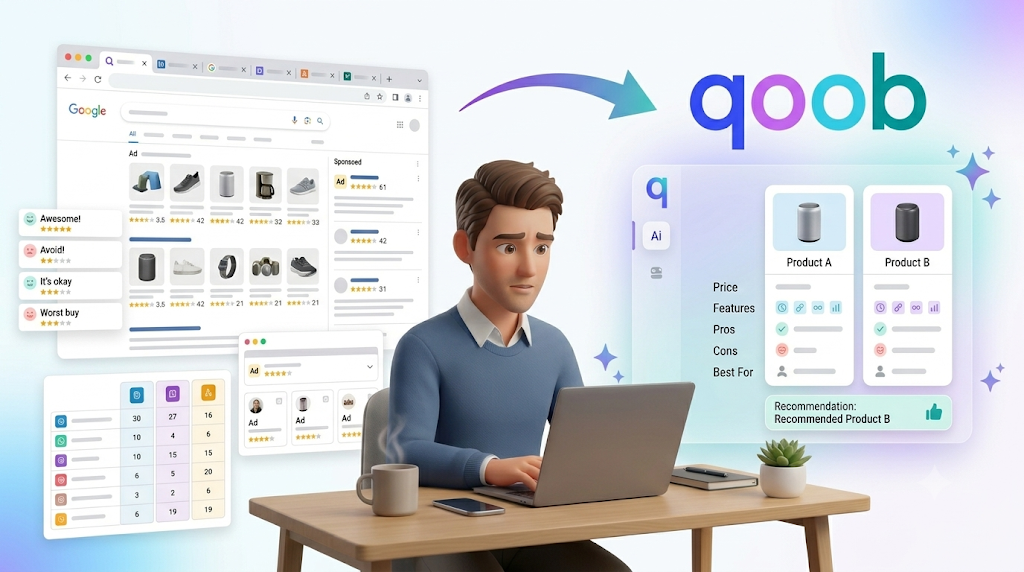
    Search has become strangely exhausting. You ask a simple question and get a page full of links, advertisements, sponsored results, and articles that take five minutes to reach the point. Then you open three tabs to work out which answer you can trust.

    The idea behind smart search is much simpler: ask your question in normal language and get a short, useful answer that helps you decide what to do next. The Qoob is built around this approach, combining search, personal context, and AI-powered answers without requiring users to learn complicated prompting.

    What Is Smart Search?

    Smart search is designed to move beyond the traditional search-box experience.

    With conventional search, you enter a query and receive a collection of pages. You then have to decide which result looks useful, open it, read it, compare information, and work out the answer yourself.

    The Qoob takes a different approach.

    You ask a question in your own words.

    Qoob interprets what you are trying to find out and provides a concise answer designed around the decision you are trying to make.

    The objective is not to give you more information.

    It is to help you get to the useful information faster.

    Why Does Qoob Focus on Short Answers?

    Most everyday searches are not research projects.

    You might want to know where to eat tonight, which product makes more sense, what to cook with ingredients you already have, or where to go this weekend.

    You usually do not need 30 web pages.

    You need an answer.

    That is why Qoob focuses on short answers rather than long blocks of text.

    The platform describes its purpose as turning large amounts of information on the web into clear, short, useful answers for everyday decisions.

    The distinction matters.

    A longer response is not automatically a better response.

    Sometimes the best answer is the one that gives you exactly what you need and then gets out of your way.

    Humanity has spent decades making it harder to find a simple answer. Qoob is taking the radical approach of removing some of the clutter.

    How Does Qoob Search Work?

    At a high level, the experience is straightforward.

    You ask a question.

    Qoob works to understand what you mean.

    It considers the context available to it.

    It then provides a concise answer aimed at helping you make a decision.

    The important part is that Qoob is not positioned as a traditional search engine or a general-purpose chatbot.

    It describes itself as a personal AI search and decision-making app.

    That distinction affects how the experience is designed.

    Instead of asking you to write a highly detailed prompt, Qoob is built around questions written naturally.

    Do You Need to Know How to Prompt AI?

    No.

    This is one of the central ideas behind Qoob.

    Many AI tools require users to learn how to phrase prompts to get useful results.

    Qoob takes the opposite approach.

    You ask your question in ordinary language.

    There is no special “AI language” to learn.

    That makes the experience closer to having a question-and-answer conversation than learning a new software interface.

    For someone who simply wants an answer, that difference can make the technology feel much less complicated.

    What Makes Smart Answers Different From Search Results?

    Traditional search results give you choices.

    That can be useful when you need to conduct detailed research.

    But it also creates work.

    Suppose you search for:

    “What should I cook tonight?”

    A conventional search may return recipes, articles, videos, shopping pages, and sponsored results.

    You still have to decide.

    A smart answer aims to reduce that process by giving you a concise response based on what you asked and the context available to Qoob.

    The goal is not to remove your decision.

    It is to make the decision easier.

    How Does Qoob Use Context?

    Personal context is one of the features that differentiates Qoob from a basic search box.

    Two people can ask the same question and want completely different answers.

    Consider the question:

    “Where should I go this weekend?”

    One person might want a quiet nature trip.

    Another might want a city break.

    Someone else might want a family-friendly activity nearby.

    A generic answer cannot account for those differences very well.

    Qoob is designed to use information you choose to share, along with previous questions and preferences, so answers can become more relevant to you.

    This is what The Qoob describes as personalized search.

    The aim is to make answers feel less generic and more connected to the person asking.

    What Is Personalized Search?

    Personalized search means the system considers more than the words in a single query.

    It can use relevant context about your preferences and previous interactions to make the result more useful.

    This can matter for everyday decisions.

    Suppose you frequently ask about restaurants.

    A generic search treats each restaurant query as a new event.

    A personalized search experience can use relevant context about what you have previously asked or what you prefer.

    The goal is not to make decisions for you.

    It is to reduce the amount of repeated explanation needed to get a useful answer.

    You can learn more about this approach on The Qoob’s personal AI search and personalization page.

    Is Qoob a Search Engine or a Chatbot?

    Qoob sits somewhere different.

    It is designed as a personal AI search and decision-making app.

    A traditional search engine primarily gives you links.

    A general chatbot is designed around conversation and content generation.

    Qoob focuses on finding useful information and turning it into a concise answer for an everyday decision.

    That difference sounds subtle.

    In practice, it changes the experience.

    The goal is not to keep you in a long conversation.

    The goal is to help you get what you need and move on.


    View this post on Instagram


    A post shared by Qoob (@qoobsearch)

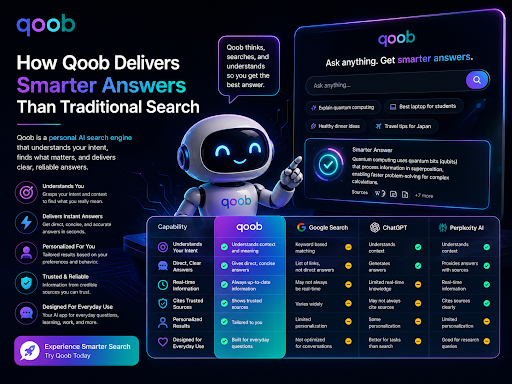
    How Is Qoob Different From Google?

    Google is fundamentally built around search results.

    You enter a query and receive pages to explore.

    That model is extremely useful when you want to browse, research deeply, visit specific websites, or compare multiple sources yourself.

    Qoob is designed for a different moment.

    It focuses on everyday questions where you want a direct answer without opening a collection of tabs.

    For example:

    Google-style experience: Search → scan results → open pages → compare → decide.

    Qoob-style experience: Ask → get a concise answer → decide.

    Neither approach needs to replace the other.

    There are times when you want deep research.

    There are also many times when you just want the answer.

    The Qoob is designed for the second situation.

    How Is Qoob Different From ChatGPT and Other AI Tools?

    Many AI tools are built to generate text.

    You can ask them to write, explain, brainstorm, summarize, or create.

    Qoob focuses more narrowly on search and everyday decision-making.

    The company describes this distinction directly: Qoob is a personal AI search app rather than another general-purpose chatbot.

    That means the experience is built around questions such as:

    • Where should I go?
    • What should I cook?
    • Which option should I choose?
    • What should I do next?
    • Which product is the better fit?

    The answer does not need to become an essay.

    It needs to help.

    What Is QoobSearch?

    You may see the name written as qoobsearch when searching for information about the platform.

    Qoob Search refers to the search experience inside the Qoob ecosystem.

    The Qoob is the broader product.

    Qoob AI refers to the personalization and answer engine behind the experience.

    These terms describe different parts of the same product rather than completely separate services.

    The distinction is useful because you may encounter all three terms when exploring the platform.

    Why Does Qoob Avoid Sponsored Results?

    One of Qoob’s core positioning points is reducing the clutter associated with conventional search.

    The company states that Qoob does not place sponsored results inside the answer itself.

    Instead, the platform uses a single non-intrusive advertisement at the bottom of the page.

    The idea is to separate the answer from promotional clutter.

    That matters because advertisements can make it harder to identify the information you are actually looking for.

    Qoob’s broader philosophy is summarized on its Why Qoob page, which focuses on saving time, reducing clutter, and helping users make decisions rather than keeping them scrolling.

    Why Does Qoob Say No AI Skills Are Needed?

    The interface is intended for normal questions.

    You do not need to learn:

    • Prompt templates
    • Special commands
    • Complex instructions
    • AI-specific terminology

    You can simply ask.

    For example:

    “What is a good dinner idea with chicken and rice?”

    “Where should I go for a weekend trip?”

    “Which option is better for a small apartment?”

    The point is not that Qoob magically knows everything.

    The point is that you should not have to become a prompt engineer to ask an everyday question.

    What Kind of Questions Can Qoob Answer?

    Qoob is designed around practical everyday decisions.

    Its website highlights examples such as:

    Travel planning

    Instead of opening dozens of travel pages, you can ask where you should go and receive a concise recommendation.

    Recipe ideas

    You can ask what to cook based on the ingredients or preferences you have.

    Shopping comparisons

    You can compare options without opening multiple product pages.

    Everyday research

    You can ask quick questions when you need a useful explanation rather than a long research session.

    Weekend planning

    You can use the platform to think through what to do with your free time.

    These examples all have something in common.

    The answer leads to an action.

    Does Qoob Give You Short Answers All the Time?

    The goal is concise answers.

    That does not mean every answer must be a single sentence.

    Some questions require context or explanation.

    The principle is to provide enough useful information to help you make the decision without adding unnecessary filler.

    That is different from forcing every question into an arbitrary word count.

    A good answer should be as long as necessary and as short as possible.

    Can Qoob Remember What You Ask?

    Qoob is designed around personalization and user-controlled context.

    The platform explains that users can control what context it remembers and that answers can become more useful as the system learns relevant preferences over time.

    That means the experience can become more personal than a completely stateless search box.

    The important part is user control.

    The company says you decide what context Qoob keeps.

    Does Qoob Sell Your Data?

    Qoob states that it does not sell your usage data.

    Its privacy approach focuses on giving users control over their information and limiting what vendors can do with it.

    The company’s privacy policy explains how information is collected, used, and disclosed across its website, app, and related services.

    For anyone evaluating a personal AI search product, privacy should be part of the decision.

    An answer is not particularly useful if getting it requires giving up control of information you did not intend to share.

    Why Does Privacy Matter for Personal Search?

    Personalization requires context.

    Context can make answers more useful, but it also creates a responsibility to handle information appropriately.

    The more a search experience adapts to you, the more important it becomes to understand what data is being retained and how it is used.

    Qoob positions privacy and user control as core parts of its product philosophy.

    That makes the relationship between personalization and privacy an important part of understanding how the platform works.

    Can Qoob Replace Google?

    Not completely.

    And it does not need to.

    Different tools are useful for different jobs.

    Google remains useful when you want:

    • Specific websites
    • News coverage
    • Deep research
    • Multiple sources
    • Maps
    • Shopping pages
    • Direct navigation
    • Broad browsing

    Qoob is designed for a narrower but common need:

    “I have a question. Help me decide.”

    That difference is important.

    You do not need one tool to perform every possible type of search.

    When Is Qoob Most Useful?

    Qoob is particularly suited to questions where the final objective is a decision.

    For example:

    “Which of these two products makes more sense for me?”

    “Where should I go this weekend?”

    “What can I cook with what I have?”

    “What should I consider before choosing this option?”

    These questions are different from:

    “Show me every website about this topic.”

    The first group benefits from concise decision support.

    The second requires broader research.

    Qoob focuses on the first.

    Why Does “No Scrolling” Matter?

    Scrolling is not inherently bad.

    Sometimes you need to browse.

    The problem starts when scrolling becomes the default cost of answering every simple question.

    You may have already experienced this:

    Search for an answer.

    Open an article.

    Scroll past a huge introduction.

    Scroll past advertisements.

    Scroll past a personal story about how the recipe reminded someone of their childhood.

    Finally reach the answer.

    For a simple question, that is unnecessary work.

    Qoob’s philosophy is based on reducing that friction.

    The platform aims to give you the useful answer first so you can decide and move on.

    How Do Smart Answers Help With Everyday Decisions?

    Everyday decisions often have a low value per search but happen constantly.

    Where should you eat?

    What should you cook?

    Which product should you choose?

    Where should you go?

    What should you do next?

    Each question is small.

    Together, they consume time.

    Smart answers are designed to reduce that time cost.

    Instead of researching every decision from scratch, you can ask a question in plain language and receive a concise response tailored to the context available to the system.

    That is the real proposition behind smart search.

    Not more information.

    Less friction.

    What Makes Qoob a Human-Centered Search Experience?

    Qoob describes its approach as “built for humans, by humans.”

    That philosophy shows up in several parts of the product:

    Plain-language questions

    You can ask questions naturally.

    Short responses

    Answers are designed to reduce unnecessary reading.

    Personal context

    Relevant preferences can help make answers more useful.

    User control

    The company emphasizes control over what information Qoob remembers.

    Reduced clutter

    The answer is designed without sponsored content inserted into the response itself.

    The overall experience is intended to feel less like operating software and more like simply asking for help.

    How Can You Get Better Results From Qoob?

    You do not need complicated prompts, but being clear still helps.

    A useful question usually includes the key information needed to make the decision.

    Instead of:

    “Restaurants?”

    Try:

    “Where should I eat tonight for a casual dinner?”

    Instead of:

    “Vacation?”

    Try:

    “Where should I go for a three-day beach trip?”

    You do not need a 500-word prompt.

    Just give Qoob enough context to understand what you actually want.

    For more general guidance on asking AI search tools better questions, see How to Get Better Answers from AI Search.

    Is Qoob Designed for Research or Decisions?

    The stronger emphasis is decisions.

    Deep research often requires multiple sources, detailed comparisons, original documents, and independent evaluation.

    Qoob is designed for everyday questions where you want a useful answer quickly.

    That does not make the answers less important.

    It makes the workflow different.

    You are not asking Qoob to become a research archive.

    You are asking it to help you get from question to decision.

    Final Thoughts

    Search does not always need to mean scrolling through pages of results.

    For many everyday questions, the real goal is not to discover everything that exists on the internet.

    It is to get a useful answer and decide what to do next.

    That is the idea behind smart search.

    The Qoob is built around plain-language questions, short answers, personalized context, and a cleaner search experience designed for everyday decisions.

    It sits somewhere between conventional search and general-purpose AI assistants, with a narrower goal: help you find useful information without making you work through unnecessary clutter.

    At The Qoob, the focus is simple.

    Ask naturally.

    Get a clear answer.

    Make your decision.

    Move on.

    That is a surprisingly useful idea in an internet that seems determined to make every five-second question into a research project.

    Frequently Asked Questions

    What is smart search?

    Smart search is a search approach that focuses on understanding what a user means and providing a useful answer rather than simply returning a list of links. The Qoob uses this model for everyday questions and decisions.

    Qoob Search is the search experience within The Qoob app. It is designed to provide short, useful answers to everyday questions and help users make decisions.

    “qoobsearch” is another way the Qoob Search name may be written. It refers to the same search experience inside The Qoob product.

    Google primarily provides a list of search results for users to explore. Qoob focuses on giving a concise answer that helps users make an everyday decision without requiring them to open and compare multiple pages.

    ChatGPT is a general-purpose conversational AI system. Qoob is positioned as a personal AI search and decision-making app focused on short answers for everyday choices.

    No. Qoob is designed so users can ask questions in plain language without learning specialized prompting techniques.

    Yes. Concise, useful answers are a central part of Qoob’s product design. The goal is to provide enough information to help users decide without unnecessary text.

    Qoob is designed for everyday decisions such as travel planning, recipe ideas, shopping comparisons, weekend planning, and quick personal research.

    Yes. Qoob is designed to use relevant context, previous questions, and user preferences to make answers more personal and useful.

    Qoob states that users have control over what context the service keeps and uses for personalization.

    Qoob states that it does not sell users’ usage data and emphasizes privacy and user control as part of its product approach.

    Qoob states that it does not place sponsored results inside the answer. Instead, it uses a single non-intrusive advertisement at the bottom of the page.

    Qoob states that its service is free, with no subscription required.

    No. Qoob describes itself as a personal AI search and decision-making app rather than a general-purpose chatbot.

    Qoob is particularly useful when you have an everyday question and want a concise answer that helps you decide. Traditional search remains useful when you need broad research, multiple sources, specific websites, or detailed browsing.
  • How to Get Better Answers from AI Search: Prompting Tips for Everyday Questions

    How to Get Better Answers from AI Search: Prompting Tips for Everyday Questions

    AI Search can save time, but the quality of the answer depends on the quality of the question. A short, vague prompt often leads to a broad reply. A clear prompt usually leads to a better one. That is why learning how to ask well is one of the most useful skills for everyday search. If you want a more personal search experience, the AI Search approach from The Qoob is worth understanding. It shows how a better search flow can help you move from a simple question to a more useful answer without extra effort.

    Why prompting matters

    Many people think AI search is only about the tool itself. In reality, the prompt does most of the work. The same system can give two very different answers depending on how the question is written. A weak prompt may leave out context, goals, or limits. A strong prompt gives the tool enough information to respond in a useful way. That does not mean writing a long message every time. It means giving the right details.

    The goal is clarity, not complexity

    You do not need technical language. You do not need special formatting. You only need to make the request easier to understand. The best prompts are often short, direct, and specific.

    What makes a better AI Search prompt

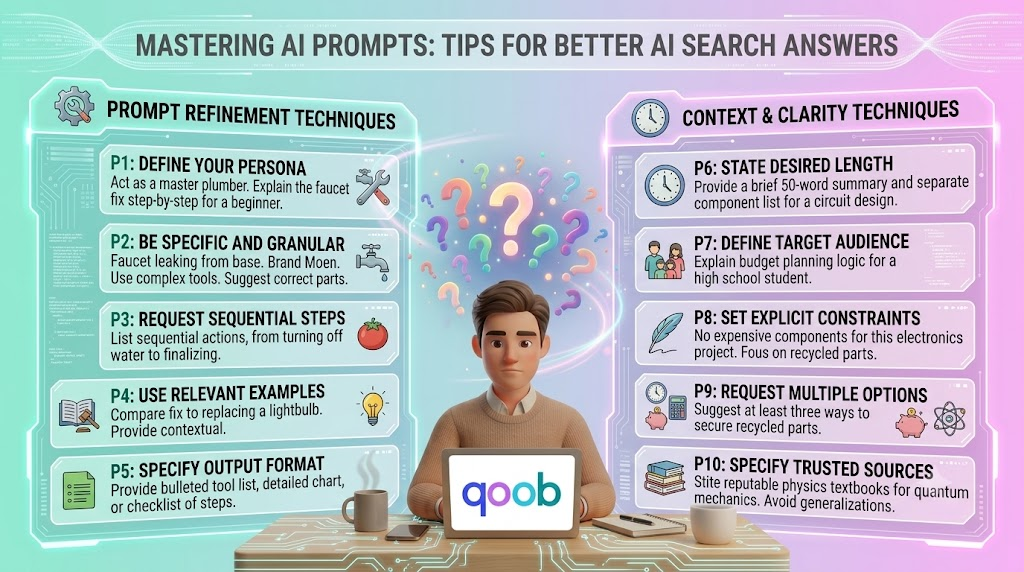
    A good prompt usually answers four simple questions:
    • What do you want?
    • What is the topic?
    • What kind of answer do you need?
    • What should the result help you do?
    When those pieces are clear, AI Search can give a more focused answer. That matters for everyday questions because most people are not trying to do deep research every time. They just want a useful next step.

    A simple prompt formula

    A practical way to write prompts is to use this structure: Task + Topic + Context + Output style For example:
    • Explain this in simple language
    • Compare these two options for home use
    • Give me quick steps for fixing this
    • Summarise this for a beginner
    This kind of structure helps AI Search understand the job faster. It also reduces the chance of getting an answer that is too broad or too advanced.

    Everyday prompting tips that improve answers

    The tips below work well for common questions. They are easy to use and do not require special knowledge.

    1. Be specific about the result you want

    Do not just ask what something is. Ask what you need from the answer. For example:
    • Weak: Tell me about email marketing
    • Better: Explain email marketing for a small business owner
    • Better still: Explain email marketing for a small business owner in simple steps
    The more exact the result, the better the reply.

    2. Add the level of detail you want

    Some questions need a short answer. Others need more detail. AI Search works better when you say which one you want. For example:
    • Give me a short summary
    • Explain it in simple terms
    • Give me three practical examples
    • Break it into steps
    This helps the tool match your time and attention level.

    3. Give context when the topic is not obvious

    Context helps AI Search avoid guessing. It also helps the response fit your situation better. For example:
    • I need this for a work email
    • I am new to this topic
    • I want a comparison for personal use
    • I need a quick answer before a meeting
    Even one extra sentence can improve the result.

    4. Ask for the format you want

    Sometimes the answer is fine, but the structure is not. You can fix that by asking for a clear format. For example:
    • Give me a bullet list
    • Show me a table
    • Write it in plain English
    • Summarise the main points first
    Format control is one of the easiest ways to improve results.

    5. Use follow-up questions

    Good AI Search use often happens in two steps. The first answer gives you a starting point. The second question makes it better. For example:
    • Can you make that shorter?
    • Can you explain the second point more clearly?
    • What would this look like in practice?
    • Can you compare that with the other option?
    This back-and-forth is useful because it lets you refine the answer without starting over.

    6. Avoid packed questions

    When one prompt contains too many unrelated things, the answer can become messy. Try to keep one main goal per question. For example:
    • Weak: Compare these tools, explain the differences, and tell me which one is better for a beginner
    • Better: Compare these tools for a beginner
    • Better still: Compare these tools for a beginner and show the differences in a table
    A cleaner prompt gives a cleaner answer. Video : https://www.instagram.com/qoobsearch/reel/DbCLXqND8oY/

    Good and bad prompt examples

    The table below shows how small changes can improve the result.
    Weak prompt Better prompt Why it works better
    Tell me about AI search Explain AI search in simple terms Gives the tool a clear task and tone
    Compare these two tools Compare these two tools for daily use Adds the use case
    How do I do this? Give me step-by-step instructions for this task Makes the format clear
    What is the best one? Which one is better for a beginner and why? Defines the audience
    Help me understand this Summarise this in plain language with one example Improves focus and output style

    How to ask better questions for everyday use

    Everyday questions are usually simple on the surface, but they still benefit from a little structure.

    For quick facts

    Use short prompts like:
    • What does this mean?
    • Why is this happening?
    • What is the difference?
    • What should I know first?
    These work well when you want a fast answer without extra detail.

    For decisions

    When you need help choosing, ask for comparison and reasoning. For example:
    • Which option is better for a small team?
    • What are the pros and cons of each one?
    • Which one is easier to use?
    • Which one saves more time?
    Decision prompts work best when you name the goal.

    For how-to questions

    When asking for steps, say so clearly. For example:
    • Show me the steps
    • Explain the process simply
    • Give me a beginner guide
    • Tell me what to do first
    This helps AI Search avoid giving a summary when you really need instructions.

    For writing help

    AI Search can also improve wording. For example:
    • Rewrite this in plain language
    • Make this sound more professional
    • Shorten this message
    • Make this easier to understand
    These prompts are useful for emails, notes, descriptions, and quick messages.

    How The Qoob supports better search habits

    Good prompting becomes even more useful when the search tool is built around clear, personal use. That is part of The Qoob’s approach. If you want to understand the platform from the ground up, the homepage is a useful place to start. The real value is not only in answering questions. It is in helping users shape better questions and get a result that fits the moment. For a deeper view of how the product is framed, the Why Qoob page gives more context on the thinking behind the platform.

    A simple checklist before you hit enter

    Before you send a prompt, check these points:
    • Is the question specific enough?
    • Did I add the context that matters?
    • Did I say how detailed I want the answer?
    • Did I mention the format I need?
    • Is there a simpler way to ask this?
    This small habit can improve results right away.

    When a better prompt changes the outcome

    A stronger prompt can save time, reduce confusion, and give you a better first answer. That matters most when you are asking about everyday topics that come up often. Think about how often people search for things like:
    • A short explanation
    • A simple comparison
    • A quick next step
    • A better way to phrase something
    • A plain-language summary
    These are the moments when prompt quality makes a real difference. For more background on how search behavior is changing, the article on why AI search is replacing Google for everyday questions gives useful context.

    A few prompt templates you can reuse

    Here are some simple templates you can adapt:
    • Explain [topic] in simple terms
    • Compare [option A] and [option B] for [use case]
    • Give me three steps to solve [problem]
    • Rewrite this message to sound clearer
    • Summarise this for a beginner in plain English
    These templates are useful because they give AI Search a clear job without making the prompt feel complicated.

    FAQ

    What is AI Search?

    AI Search is a way of asking questions that uses artificial intelligence to return direct, useful answers instead of only a list of links.

    Prompts matter because the tool uses your wording to decide what kind of answer to give. Clear prompts usually lead to better results.

    It should be as short as possible while still giving enough context. A few clear words are often enough.

    Yes. Follow-up questions are one of the best ways to improve the first answer and make it more useful.

    Be specific, add context, and say what kind of answer you want. That usually improves the result right away.

    Conclusion

    Better answers from AI Search usually start with better prompts. You do not need to write long instructions. You only need to be clear about what you want, why you want it, and how you want the answer to look. That simple habit can make everyday search faster, easier, and far more useful.

    For users who want a more personal and practical search experience, The Qoob is a relevant place to explore how better search habits can fit into daily work and everyday questions.

  • 10 Everyday Questions You Didn’t Know an AI Search App Could Answer

    10 Everyday Questions You Didn’t Know an AI Search App Could Answer

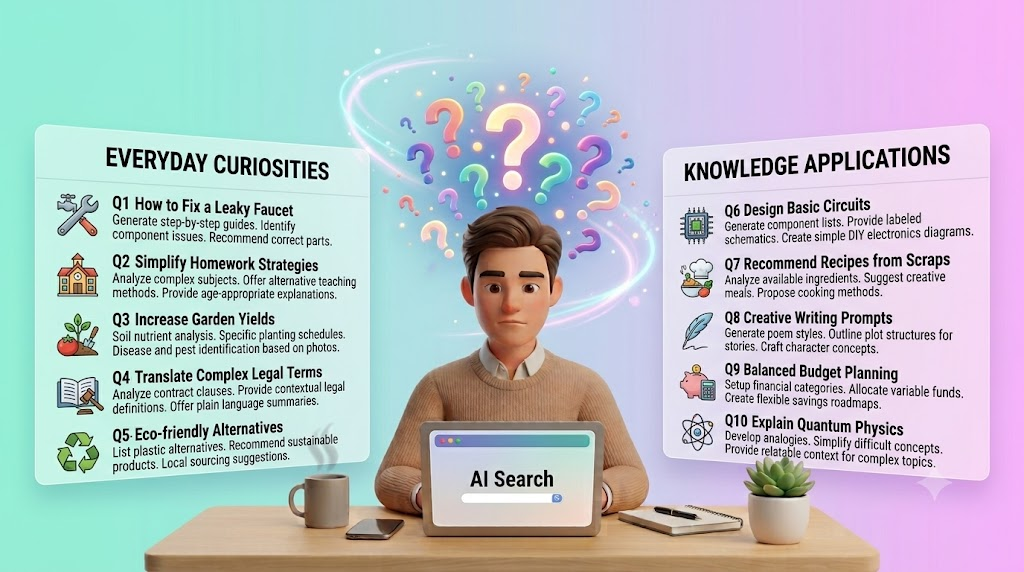
    People often think of search as something they use for big research tasks, complex work questions, or product comparisons. In reality, search tools are used for small daily decisions all the time. That is where a modern AI Search App can be more useful than many people expect. It can help with simple, practical questions that come up during the day and turn them into fast, clear answers.

    The Qoob is designed around a more personal search experience, which makes it a useful example of how search can fit everyday life. If you are comparing how different tools work, the homepage is a good starting point for understanding the broader platform and how it is positioned around search that feels more natural to use.

    Why everyday questions matter

    Not every search starts with a serious project. Many start with a small problem, a basic need, or a quick decision. You may want to compare options, check a detail, or get a simple explanation before you move on with your day.

    That is where AI search feels different from traditional search. Instead of making you sort through many pages, it can help you move from question to answer more directly. For repeated daily use, that speed can matter a lot.

    The value of simple answers

    A good search experience does not need to feel complicated. It should help you save time, reduce confusion, and give you enough context to act with confidence. That is especially useful when the question is small but still important.

    10 everyday questions an AI Search App can answer

    The examples below show how an AI Search App can help with normal day-to-day needs, not just advanced research.

    1. What is the quickest way to explain a topic?

    Many people need a short, simple explanation of something before they can decide what to do next. This may be a concept, a product feature, a process, or even a word they do not fully understand.

    An AI search tool can give a clear summary without making you read through long articles first. That makes it useful for busy users who just need the main point.

    2. How do I compare two things?

    Comparison questions come up all the time. You may want to compare tools, methods, services, or even everyday options like routes, plans, or features.

    AI search can help frame the difference in a more direct way. Instead of scanning multiple sources one by one, you can ask for a side-by-side explanation and get a faster starting point.

    3. What should I do first?

    People often know they have a problem, but not the order of steps to solve it. That is common in work, travel, home tasks, and planning.

    A search app can help break a question into a simple sequence. It can show the first step, the second step, and the next decision to make. That makes it easier to move forward without overthinking.

    4. What does this term mean?

    Many searches begin with a term that sounds familiar but is not fully clear. This could be a technical word, a policy term, a product label, or a business phrase.

    An AI Search App can give a plain-language explanation. That is especially helpful when you want the meaning without getting stuck in jargon.

    5. How do I choose between options?

    People often search when they are stuck between two or three possible choices. The question might be about tools, services, prices, or features.

    Search that supports direct comparison can help users narrow the field faster. The goal is not just to provide information. It is to help the user make a clearer decision.

    6. What is the latest update on this topic?

    Even everyday users need current information. That may include a product change, a policy shift, a service update, or a new way of doing something.

    AI search can help surface recent context faster than a manual search session in some cases. It is useful when you want a quick status check before you move on.

    For a wider discussion of how this style of search is changing daily behavior, the article on why AI search is replacing Google for everyday questions gives helpful background.

    Video : https://www.instagram.com/qoobsearch/reel/DbT4YyLlN-w/

    7. What is the best way to phrase this?

    Sometimes the problem is not the answer. It is the wording. You may need to write a message, a question, or a search query, but you are not sure how to say it.

    An AI search tool can help reframe your idea in simpler language. That saves time and often leads to better results because the query becomes more specific.

    8. What can I do with this information?

    Information is only useful if it leads to action. Many people search because they want to know the next practical step.

    A good AI search experience can move beyond facts and help you think about what to do next. That could be a follow-up question, a comparison, a checklist, or a decision path.

    9. How do I solve a small problem?

    Everyday search is often about small issues that interrupt the day. Maybe something is not working, a process is unclear, or you need a quick fix.

    AI search can help narrow down the likely cause and show a practical next step. That is useful because many small problems do not need a full research session. They just need a clear answer.

    10. What should I remember from this?

    People often search more than once for the same topic because the first answer was too broad. A better AI Search App can help reduce that repeat work by giving a cleaner summary and a stronger takeaway.

    This matters because the best search tools do more than answer a single question. They help users remember what matters and continue the task with less friction.

    Everyday questions and the kind of help they need

    Not all searches need the same response. Some need a short definition. Others need a comparison or a next step. The table below shows how different kinds of questions usually map to different kinds of support.

    Everyday question type What the user needs How AI search helps
    Definition question A simple explanation Gives a clear summary in plain language
    Comparison question A direct side-by-side view Helps sort options faster
    How-to question Step-by-step guidance Breaks the task into manageable steps
    Decision question A practical recommendation Helps narrow the choice
    Update question Recent information Reduces time spent checking multiple sources
    Rewording question Better phrasing Helps create a clearer query or message

    Why this matters for daily use

    The reason AI search is useful in everyday life is simple. Most people do not need a perfect research paper every time they type a question. They need a fast answer they can understand and use.

    It saves time

    When a tool gives a direct answer, users spend less time digging through pages. That matters most when the question is small but repeated often.

    It reduces friction

    A search app that understands natural language can feel easier to use. Users can ask questions the way they actually think, instead of trying to match exact keywords.

    It helps users stay focused

    The more quickly someone gets the right answer, the faster they can return to the task they were already doing. That is a major reason people keep using better search tools once they try them.

    How The Qoob fits into this

    The Qoob focuses on a more personal search experience, which can be useful for people who want search to feel simpler and more direct in daily use. If you want to understand how that experience is structured, the Qoob search page is the most relevant place to look.

    That kind of approach matters because everyday questions are often small, but they still need clear answers. A tool that handles those questions well can become part of a user’s normal routine.

    What makes an AI Search App useful in practice

    A useful search app is not only fast. It is also easy to understand, easy to return to, and good at handling repeated questions without adding confusion.

    Good signs to look for

    • Clear answers
    • Simple language
    • Fast follow-up support
    • Helpful comparisons
    • Easy navigation
    • Consistent results

    When these pieces come together, search becomes less of a task and more of a habit.

    FAQ

    What is an AI Search App?


    An AI Search App is a tool that uses artificial intelligence to answer questions, explain topics, compare options, and help users search in a more natural way.

    Yes. It can help with definitions, comparisons, small decisions, how-to questions, and quick explanations that come up during the day.

    It can be, especially when the user wants a direct answer instead of sorting through many links. The best option depends on the task and the tool design.

    No. Most people can use an AI Search App by typing questions in normal language. That is one of the main benefits.

    Because it saves time and makes answers easier to understand. Small questions are often repeated often, so faster search can make a big difference.

    An AI Search App is a tool that uses artificial intelligence to answer questions, explain topics, compare options, and help users search in a more natural way.

    Yes. It can help with definitions, comparisons, small decisions, how-to questions, and quick explanations that come up during the day.

    It can be, especially when the user wants a direct answer instead of sorting through many links. The best option depends on the task and the tool design.

    No. Most people can use an AI Search App by typing questions in normal language. That is one of the main benefits.

    Because it saves time and makes answers easier to understand. Small questions are often repeated often, so faster search can make a big difference.

    Conclusion

    An AI Search App is not only for big research jobs. It can also answer the small questions people ask every day, from simple definitions to quick comparisons and next steps. That makes it useful in a way many people do not expect at first.

    If you are comparing tools or want to see how a more personal search experience works, visit The Qoob to explore the platform and see how it fits into everyday search habits.

  • Is AI Search Private? What You Should Know Before You Type Your Next Question

    Is AI Search Private? What You Should Know Before You Type Your Next Question

    AI Search is changing how people find answers. It is faster than regular search, easier to use, and often feels more natural. You type a question and get a direct reply. That is useful. But it also raises a fair question: what happens to the information you type?

    If privacy matters to you, it is worth understanding how AI tools may handle your prompts, your account data, and your activity history. A good place to start is the private AI assistant page, which shows why privacy should be part of the conversation before you trust any search tool with personal or work-related questions.

    Why privacy matters in AI Search

    Search used to feel simple. You typed a query, got results, and moved on. AI Search is different because the tool may process more than just keywords. It may read the full question, the context around it, and sometimes the follow-up questions too.

    That makes the experience helpful, but it also means you should be careful about what you share. A search tool may not be the right place for private notes, business secrets, legal details, health information, or anything you would not want stored or reviewed later.

    The main privacy risk

    The biggest risk is not always a public leak. Often, the issue is data collection. If a tool keeps prompts, account details, or usage logs, that information may be used to improve the product, troubleshoot problems, or personalize the experience.

    That does not automatically make the tool unsafe. It just means you should know the rules before you use it for sensitive work.

    What AI Search may collect

    Different tools collect different types of data. The exact details depend on the product, but common examples include:

    • Your search questions

    • Follow-up prompts

    • Account information

    • Device or browser data

    • Usage patterns

    • Feedback you submit

    Some tools may use this data to improve search quality. Others may use it to keep your sessions synced across devices or to help with support. The important point is to read the privacy terms before you assume anything is private by default.

    Why “private” does not always mean “invisible”

    A tool can still call itself private while keeping some data for service functions. In practice, “private” may mean that your data is not shared publicly, not sold to advertisers, or protected with account controls. That is helpful, but it is not the same as complete secrecy.

    Video Embed : https://www.instagram.com/qoobsearch/reel/DbOhBW6jh3S/

    Questions to ask before you trust an AI Search tool

    Before you use any AI Search product for important work, ask a few simple questions.

    Start with these

    1. Does the tool save my prompts?

    2. Can I delete my history?

    3. Is my data used for training?

    4. Can I control what is stored?

    5. Is the privacy policy easy to understand?

    6. Does the tool offer a business or personal mode?

    These questions help you judge whether the tool fits your comfort level. If the answers are vague, that is a warning sign.

    How privacy affects real search behavior

    People often type more into AI Search than they would into a normal search bar. That is because the exchange feels more personal and conversational. You may explain your goal, your problem, and your situation in one message.

    That is useful, but it also means you should slow down before typing sensitive details. Even a simple question can include information about your company, client, location, budget, or strategy.

    Examples of what to avoid

    You may want to avoid entering:

    • Passwords or login details

    • Private client information

    • Internal business plans

    • Confidential numbers or contracts

    • Medical or legal records

    • Anything tied to another person’s identity

    If the question could create trouble if seen later, it is safer not to type it in full.

    How to use AI Search more safely

    You do not need to stop using AI Search. You just need better habits.

    Safer ways to search

    • Use broad questions instead of exact private details

    • Remove names, account numbers, and sensitive files

    • Check whether the tool has a history or memory feature

    • Log out after use on shared devices

    • Review privacy and data settings

    • Delete old searches when the tool allows it

    These steps are simple, but they reduce risk fast. They also help you keep better control over what data the tool can see.

    The difference between search privacy and account privacy

    These two things are related, but they are not the same.

    Search privacy is about what happens to the question you type and the answers you get. Account privacy is about your login, profile, saved preferences, and activity history.

    A tool may protect your account well but still store search prompts for service reasons. Another tool may limit prompt storage but still collect technical data from your device. That is why it helps to look at the whole picture.

    What matters most

    If you only remember one thing, remember this: privacy is not one switch. It is a set of rules. Those rules can cover storage, sharing, training, history, and deletion. The better you understand them, the safer your search habits become.

    Why personal search tools should be reviewed carefully

    Some AI tools are built around personal search. That can make them useful, but it can also make them more sensitive. A personal system may know more about your habits, your topics, and your past questions. That can improve the experience, but it also increases the amount of information the tool may handle.

    For a broader view of how this fits into the search experience, the personal AI search guide 2026 is a helpful reference. It explains how personal search is changing the way people find and use information.

    What to check in the privacy policy

    Privacy policies are often long, but you do not need to read every line to get the main idea. Focus on the parts that answer the most important questions.

    Look for these sections

    • What data is collected

    • How long data is kept

    • Whether data is used for training

    • Whether data is shared with third parties

    • How users can delete data

    • Whether different plans have different privacy rules

    If a company makes these points clear, that is a positive sign. If the policy is hard to understand or hides key details, be cautious.

    How companies should think about AI Search privacy

    For businesses, privacy matters even more. Employees may use AI Search for research, writing, planning, or support. That can save time, but it also creates risk if people paste sensitive information into tools without thinking.

    A simple internal rule can help. Ask staff to avoid entering confidential data unless the tool is approved for that purpose. That one habit can prevent many problems later.

    Good team habits

    • Set clear rules for what can be searched

    • Train people on safe prompt writing

    • Use approved tools for sensitive work

    • Review privacy settings regularly

    • Keep work and personal search separate

    These habits are easy to apply and can reduce risk without slowing people down too much.

    How The Qoob frames private AI search

    The Qoob focuses on a more privacy-aware search experience, which makes it relevant for people who want more control over their questions and results. If privacy is a major concern, it is worth understanding how the Qoob search experience is positioned and what kind of search flow it supports.

    The real question is not whether AI Search is useful. It is whether the tool gives you enough control to use it with confidence.

    When to be extra careful

    Some searches deserve more caution than others.

    High-risk topics

    • Health questions with personal details

    • Legal issues involving names or documents

    • Financial questions with account data

    • Client work that is not public

    • Internal business strategy

    • Personal identity or private life details

    In these cases, use the tool carefully or avoid entering the sensitive parts entirely. A general question is safer than a detailed one.

    A simple privacy checklist

    Before you type your next question, pause and check these points:

    • Is the topic sensitive?

    • Does the tool store history?

    • Can I delete or limit data sharing?

    • Am I using a trusted account?

    • Would I be comfortable seeing this prompt again later?

    If the answer to any of these is unclear, it is worth slowing down.

    FAQ

    Is AI Search private by default?

    Not always. Some tools store prompts, usage data, or account history. You should check the privacy settings and policy of each tool you use.

    Yes, some tools can. Others may allow you to turn history off or delete old prompts. The exact setup depends on the product.

    It is usually better not to enter sensitive personal information unless you trust the tool and understand how it handles data.

    Use broad questions, avoid private details, review privacy settings, and delete history when possible. Shared devices need extra care.

    Look at what data is collected, how long it is stored, whether it is used for training, and whether you can control or delete it.

    Conclusion

    AI Search is useful, but privacy should come first. Before you type your next question, think about what the tool may collect, how long it may keep it, and whether you are comfortable with that. Small habits like avoiding sensitive details and checking settings can make a big difference.

    If you want to understand privacy-focused search in more detail, The Qoob provides a useful starting point. You can learn more and compare options through The Qoob if you are reviewing how private AI search fits your workflow.

  • How to Make Better Buying Decisions: A Simple Framework for Comparing Products

    How to Make Better Buying Decisions: A Simple Framework for Comparing Products

    Buying a new product should be straightforward. Yet many purchases become frustrating because there are too many options, conflicting reviews, and endless comparison articles. Whether you’re shopping for electronics, home appliances, software, or everyday essentials, making the right choice often feels harder than it should.

    Instead of relying on guesswork, use a structured approach. An AI decision assistant can help organize information, but understanding a simple framework for Better Buying Decisions allows you to evaluate products more confidently regardless of what you’re purchasing.

    Why buying decisions feel overwhelming

    Consumers have access to more information than ever before. Product pages, customer reviews, comparison websites, influencer recommendations, and AI-generated summaries all compete for your attention.

    While having more information sounds helpful, it often creates the opposite effect. Instead of making decisions easier, it leads to analysis paralysis.

    Common challenges shoppers face

    Many buyers struggle because they:

    • Compare too many products
    • Focus on features they may never use
    • Read hundreds of conflicting reviews
    • Prioritize price over long-term value
    • Delay purchasing because they’re afraid of making the wrong choice

    A simple evaluation process helps eliminate these problems.

    Start with your actual needs

    Before comparing products, identify what you’re trying to solve.

    Ask yourself:

    • What problem am I trying to fix?
    • Which features are essential?
    • Which features are optional?
    • How often will I use this product?
    • What’s my realistic budget?

    Answering these questions prevents unnecessary comparisons between products that don’t fit your needs.

    Avoid shopping based only on popularity

    The highest-rated product isn’t always the best choice.

    For example:

    • A professional camera may be unnecessary for casual photography.
    • A premium laptop may offer features you’ll never use.
    • A large kitchen appliance may not fit your available space.

    The best product is the one that solves your specific problem efficiently.

    Compare products using the same criteria

    Many people compare products randomly.

    Instead, evaluate each option using identical factors.

    Comparison Factor Why It Matters
    Price Determines affordability and value
    Features Shows whether the product meets your needs
    Quality Indicates expected durability
    Ease of use Affects the everyday experience
    Customer support Helps after the purchase
    Warranty Protects your investment
    Reviews Highlights real-world experiences

    Looking at every product through the same lens makes comparisons much more objective.

    Step 1: Separate essential features from extras

    Not every advertised feature deserves equal attention.

    Essential features

    These directly affect your purchase.

    Examples include:

    • Battery life
    • Performance
    • Size
    • Storage capacity
    • Build quality

    Nice-to-have features

    These may improve the experience but aren’t necessary.

    Examples include:

    • Premium finishes
    • Extra accessories
    • Decorative design elements
    • Specialty modes

    Focusing on essentials helps avoid paying more for features you’ll rarely use.

    Step 2: Compare total value, not just price

    The cheapest option isn’t always the most affordable over time.

    Consider:

    • Expected lifespan
    • Maintenance costs
    • Replacement expenses
    • Warranty coverage
    • Reliability

    Sometimes spending slightly more initially reduces future costs significantly.

    Think beyond the purchase price

    For example:

    • Energy-efficient appliances reduce utility bills.
    • Durable furniture lasts longer.
    • Better software may reduce ongoing subscription costs.

    Value comes from long-term usefulness rather than the initial receipt.

    Step 3: Read reviews strategically

    Customer reviews are valuable when used correctly.

    Instead of reading hundreds of comments, look for consistent patterns.

    Pay attention to repeated mentions of:

    • Build quality
    • Customer service
    • Reliability
    • Ease of setup
    • Long-term performance

    If the same strengths or weaknesses appear repeatedly, they’re probably worth considering.

    Ignore isolated complaints

    Every product receives occasional negative reviews.

    Focus on recurring issues instead of one unusual experience.

    Step 4: Compare products side by side

    A comparison table makes decision-making much easier.

    Feature Product A Product B
    Price ✔ ✔
    Key Features ✔ ✔
    Warranty ✔ ✔
    Customer Reviews ✔ ✔
    Ease of Use ✔ ✔
    Overall Value ✔ ✔

    Seeing information together often makes the better option much clearer.

    Step 5: Consider your future needs

    Many purchases are long-term investments.

    Ask yourself:

    • Will this still meet my needs in two years?
    • Can it expand with future requirements?
    • Will accessories remain available?
    • Is software support likely to continue?

    Thinking ahead reduces the chance of replacing products sooner than expected.

    Avoid common buying mistakes

    Buying emotionally

    Sales, countdown timers, and limited-time promotions often create unnecessary pressure.

    Take a moment to evaluate whether the product actually meets your needs.

    Comparing too many products

    Comparing ten nearly identical products usually creates confusion.

    Narrow your shortlist to three or four serious options.

    Ignoring trusted sources

    Look for reliable information instead of relying entirely on advertisements or influencer opinions.

    Balanced comparisons usually produce better decisions.

    Forgetting long-term ownership

    Ownership includes maintenance, accessories, upgrades, and support, not just the purchase price.

    How AI helps simplify product comparisons

    Artificial intelligence can reduce the amount of manual research required when comparing products.

    Instead of opening dozens of tabs, modern AI tools can organize information, summarize differences, and highlight the factors that matter most.

    For example, QOOB Search focuses on delivering more organized answers that help users compare products more efficiently instead of forcing them to browse through multiple search results.

    Why context creates better recommendations

    Two people shopping for the same product may need completely different recommendations.

    Someone buying a laptop for gaming has different priorities than someone purchasing one for office work.

    That’s why personalized context produces stronger recommendations than generic comparison lists.

    This idea is explored further in What Makes QOOB Different From Other AI App, which explains how contextual understanding can improve decision-making.

    A practical framework for Better Buying Decisions

    You can simplify almost every purchase by following the same process:

    1. Define your actual need.
    2. Set a realistic budget.
    3. List essential features.
    4. Compare products using identical criteria.
    5. Review long-term value.
    6. Read reviews for recurring themes.
    7. Shortlist two or three options.
    8. Make your decision without endless comparisons.

    Following this process removes much of the uncertainty from buying decisions.

    Benefits of using a structured comparison process

    A simple framework helps you:

    • Save research time
    • Reduce impulse purchases
    • Focus on value instead of marketing
    • Compare products objectively
    • Feel more confident after purchasing

    Most importantly, it helps you avoid information overload.

    FAQ

    1. What are Better Buying Decisions?

    Better Buying Decisions involve evaluating products using consistent criteria such as price, quality, features, reviews, and long-term value instead of making impulsive purchases.

    2. How many products should I compare?

    Three to four products are usually enough. Comparing too many options often creates confusion instead of improving your decision.

    3. Should price be the most important factor?

    No. Price should be balanced with quality, reliability, warranty, customer support, and expected lifespan to determine overall value.

    4. How do AI tools help compare products?

    AI tools organize product information, summarize differences, and highlight relevant features, making research faster and easier.

    5. Why is context important when comparing products?

    The best recommendation depends on your specific goals, budget, and intended use. Context allows recommendations to be more relevant than generic product rankings.

    Conclusion

    Making Better Buying Decisions doesn’t require reading hundreds of reviews or comparing dozens of products. A simple framework based on your needs, budget, essential features, and long-term value helps you make confident choices while avoiding information overload.

    As AI continues to improve product research, decision-making becomes faster and more personalized. To learn more about how contextual AI supports smarter comparisons, visit QOOB and explore how modern search experiences help simplify complex buying decisions.

  • Why People Are Switching from ChatGPT to Specialized AI Search Tools

    Why People Are Switching from ChatGPT to Specialized AI Search Tools

    Artificial intelligence has transformed how people find information, solve problems, and make decisions. While ChatGPT remains one of the most popular AI tools available today, many users are now exploring specialized AI search platforms designed to provide faster, more personalized, and more relevant answers. This shift has fueled growing interest in solutions like a modernQoob Search AI search engine built for everyday information discovery.

    As users seek better ways to find accurate information, a new question is emerging: Is a specialized AI search tool a better choice than a general-purpose chatbot?

    The Rise of Personal AI Search

    Traditional search engines provide a list of links, while chatbots generate conversational responses. However, many users need something in between – a system that understands their intent and delivers personalized results instantly.

    This is where personal AI search comes in.

    If you’ve ever wondered what is personal AI search, it’s an AI-powered approach that learns from your preferences, understands context, and provides highly relevant answers tailored to your needs. Rather than forcing users to sift through dozens of websites or lengthy conversations, it focuses on delivering useful information quickly.

    Platforms like Qoob Search are leading this evolution by creating a smarter search experience that combines AI intelligence with personalized results.

    Why Users Are Looking Beyond ChatGPT

    ChatGPT is an excellent tool for content generation, brainstorming, and conversation. However, many users are discovering limitations when they need quick, precise answers for everyday questions.

    Some common reasons people search for the best ChatGPT replacement app include:

    Faster Information Retrieval

    When users have simple questions, they often want direct answers rather than lengthy discussions. A specialized AI search engine is designed to prioritize speed and relevance, helping users find information without unnecessary back-and-forth interactions.

    Personalized Search Experience

    Most people ask similar types of questions repeatedly. A personal AI search platform can learn from user behavior and deliver more customized results over time, creating a more efficient experience.

    Better Support for Everyday Decisions

    Modern consumers use AI for much more than writing content. They rely on it for travel planning, product comparisons, health research, financial insights, and daily problem-solving.

    A dedicated decision making AI tool can help users evaluate options quickly and make informed choices with greater confidence.

    Reduced Information Overload

    One of the biggest challenges online is sorting through excessive information. Specialized AI search platforms focus on delivering concise, relevant insights instead of overwhelming users with countless sources and conflicting opinions.

    ChatGPT vs Qoob: Understanding the Difference

    The discussion around ChatGPT vs Qoob is not necessarily about which platform is better overall. Instead, it comes down to user goals.

    ChatGPT excels at:

    • Content creation
    • Brainstorming ideas
    • Writing assistance
    • Creative projects
    • Conversational interactions

    Qoob Search focuses on:

    • Personalized search experiences
    • Fast information retrieval
    • Everyday question answering
    • Context-aware recommendations
    • Decision support and research

    For users who primarily need accurate answers and efficient information discovery, a specialized AI app for everyday questions may provide a more streamlined experience.

    How Qoob Search Meets Modern User Needs

    Today’s users expect technology to understand their intent immediately. They want answers without spending time refining prompts or reviewing multiple sources.

    Qoob Search addresses these expectations by combining intelligent search capabilities with personalized AI assistance. As a modern personal AI search platform, it helps users:

    • Find information faster
    • Discover more relevant results
    • Improve daily productivity
    • Make informed decisions
    • Reduce time spent searching online

    Whether someone is researching a purchase, comparing services, planning a trip, or simply looking for reliable information, Qoob Search offers a focused experience designed around real-world needs.

    The Future of AI Search

    The future of AI is becoming increasingly personalized. Users no longer want generic search results or one-size-fits-all responses. They expect AI systems to understand their preferences, context, and goals.

    This trend is driving demand for specialized solutions that go beyond traditional search and chatbot experiences.

    As more people explore alternatives and compare ChatGPT vs Qoob, platforms built around personalized information discovery are gaining attention. The growing popularity of personal AI search reflects a broader shift toward smarter, faster, and more user-focused technology.

    For individuals seeking a practical AI app for everyday questions, better decision-making support, and a more efficient search experience, specialized AI search tools may represent the next step in the evolution of online information discovery.

    FAQs

    1. What is personal AI search?

    Personal AI search uses AI to provide personalized, relevant answers based on your search intent and preferences.

    1. What is Qoob Search?

    Qoob Search is a personal AI search engine that helps users find answers, insights, and recommendations faster.

    1. How is Qoob Search different from ChatGPT?

    Qoob Search focuses on personalized search and quick answers, while ChatGPT is designed for conversations and content generation.

    1. Can Qoob Search help with everyday decisions?

    Yes. Qoob Search helps users compare options, research topics, and make informed decisions quickly.

    1. Is Qoob Search a good ChatGPT alternative?

    Yes. Users looking for faster answers and a personalized AI search experience often choose Qoob Search as a ChatGPT alternative.

  • How Students Can Use AI Search for Faster Research

    How Students Can Use AI Search for Faster Research

    Research is an essential part of academic success, but it often takes hours to find reliable information, compare sources, and organize notes. With the rise of artificial intelligence, students now have access to smarter tools that can simplify the research process. One of the most effective solutions is a personal AI search that delivers personalized, relevant, and accurate results in seconds.

    This is where Qoob Search is changing the way students learn and research.

    What Is Personal AI Search?

    A personal AI search system uses artificial intelligence to understand your questions, learning habits, and preferences. Instead of displaying hundreds of links like traditional search engines, it provides direct answers, summarized information, and contextually relevant results.

    Unlike generic search platforms, a personal AI search engine helps students focus on finding answers rather than spending valuable time searching for them.

    What Is Qoob?

    Qoob is an advanced AI assistant app designed to deliver a smarter and more personalized search experience. It combines AI-powered search capabilities with intelligent assistance to help users find information faster, organize knowledge, and improve productivity.

    For students, Qoob Search acts as a research companion that reduces information overload and makes learning more efficient.

    How Qoob Search Helps Students Research Faster

    1. Get Instant Answers to Complex Questions

    Traditional searches often require opening multiple tabs and reading lengthy articles. With Qoob Search, students can ask detailed questions and receive concise, relevant answers immediately.

    Whether you’re researching history, science, business, or technology, the platform helps you reach key insights quickly.

    2. Save Time on Academic Research

    Students frequently spend hours gathering information from different websites. A personal AI search engine simplifies this process by analyzing multiple sources and presenting the most useful information in a structured format.

    This means less time searching and more time learning.

    3. Improve Assignment Quality

    High-quality assignments require accurate information and strong understanding of a topic. An AI assistant app can help students explore concepts, understand difficult subjects, and identify relevant supporting information for essays and projects.

    By accessing better insights faster, students can produce more informed and well-researched work.

    4. Reduce Information Overload

    The internet contains billions of pages, making it difficult to identify trustworthy information. Qoob Search filters unnecessary content and focuses on delivering the most relevant results based on your query.

    Students can spend less time evaluating sources and more time applying knowledge.

    5. Enhance Learning Efficiency

    AI-powered search tools don’t just provide answers – they help users understand topics more effectively. Students can ask follow-up questions, explore related concepts, and gain deeper insights without starting a new search every time.

    This interactive approach creates a more engaging learning experience.

    Why Students Are Choosing Personal AI Search

    The demand for personal AI search solutions continues to grow because students need faster, smarter ways to access information. Modern educational environments require quick access to reliable knowledge while maintaining accuracy and efficiency.

    With tools like Qoob Search, students can:

    • Research topics more quickly
    • Understand complex concepts faster
    • Improve productivity
    • Organize information efficiently
    • Reduce time spent searching online

    As AI technology continues to evolve, personalized search experiences will become an essential part of academic success.

    The Future of Student Research

    The future of education is increasingly powered by artificial intelligence. Students who adopt AI-driven tools today can gain a significant advantage in managing coursework, conducting research, and learning new concepts.

    Whether you’re preparing a research paper, completing assignments, or studying for exams, Qoob Search provides a smarter way to discover information. As a powerful personal AI search engine and AI assistant app, it helps students work more efficiently and focus on what matters most learning.

    If you’re looking for a faster, more personalized approach to research, now is the perfect time to explore what Qoob Search can do.

    FAQs

    1. What is Qoob Search?

    Qoob Search is an AI-powered personal search platform that helps users find relevant information faster through personalized and intelligent search experiences.

    2. What is personal AI search?

    Personal AI search uses artificial intelligence to deliver customized search results, direct answers, and relevant information based on user intent and preferences.

    3. How does Qoob Search help students?

    Qoob Search helps students save time, find accurate information quickly, reduce information overload, and improve research efficiency for assignments and projects.

    4. Is Qoob Search different from traditional search engines?

    Yes. Traditional search engines provide lists of links, while Qoob Search uses AI to understand questions and deliver more personalized, direct, and relevant answers.

    5. Can students use Qoob Search for academic research?

    Absolutely. Students can use Qoob Search to research topics, understand complex concepts, gather information for assignments, and enhance their overall learning experience.

  • How Qoob Delivers Smarter Answers Than Traditional Search

    How Qoob Delivers Smarter Answers Than Traditional Search

    The way people search is changing. Traditional search engines have helped us find websites for decades, but most of us want more than a list of links now. We want a direct answer, something relevant, and we do not want to open six tabs to get it. That shift is why personal AI search apps are catching on, and it is the gap Qoob is built to fill. 

    Where traditional search falls short 

    Traditional search runs on keywords and rankings. You type a query, it returns pages that might have what you need, and then the real work starts: open a few, compare them, and figure out which to trust. 

    For big research that is fine. For an everyday question it is a lot. The usual result is information overload, time lost, and conflicting answers across sites. Traditional search is still useful, but it hands you raw material when you often want a finished answer. 

    What is personal AI search? 

    Personal AI search is a different way to find information. Instead of matching keywords, it looks at what you mean and what is relevant to you, then gives back a useful answer. 

    The short version: personal AI search helps you find answers based on what you actually mean, not the exact words you typed. Qoob is built around this. The result feels more natural and more personal than a search box, and it is pointed at helping you decide rather than sending you somewhere else to read. 

    Qoob for everyday questions 

    Plenty of AI tools are built to generate content. Everyday users usually need something simpler: a quick, clear answer to a practical question. 

    As an AI app for everyday questions, Qoob focuses on answers that are: 

    • Easy to understand 
    • Relevant to what you asked 
    • Quick to get 
    • Useful for an actual decision 

    Whether you are researching something, comparing two products, learning a new thing, or planning, Qoob cuts the effort it takes to get to a useful answer. 

    How Qoob compares to other tools 

    Qoob is not trying to be everything. It is a personal AI search app, so it is built for a specific job:

    finding and deciding. Here is the short version of how it sits next to the tools people ask about. 

    Google is built to send you to websites. Qoob is built to give you the answer. More in our Qoob vs Google comparison. 

    ChatGPT is a general assistant for writing and conversation. Qoob is search-first and decision-focused. See how Qoob works as a ChatGPT alternative for personal search. 

    Perplexity is strong for research with citations. Qoob leans toward personal, everyday answers and remembered context. See Qoob as a Perplexity alternative. 

    Each link goes deeper. The point here is simple: Qoob’s lane is personal search for everyday decisions. 

    Smarter answers for everyday life 

    Search is moving from keywords and links toward clear, relevant answers. Most people do not want to sort through results. They want something that gets what they are asking and gives back something useful right away. 

    That is the job Qoob is built for. For the everyday questions that fill a normal week, a short, personal answer beats a page of blue links. 

    FAQs 

    1.What is personal AI search? 

    Personal AI search uses AI to focus on what you mean and what is relevant to you, then gives a short, useful answer instead of a list of links. It is more personal than a traditional search engine. 

    2.How is Qoob different from Google Search? 

    Google Search sends you to websites to find information. Qoob is a personal AI search app that gives you a short, relevant answer directly, which is faster for everyday questions. 

    3.Is Qoob an AI app for everyday questions? 

    Yes. Qoob is built to help with everyday questions like planning, recipes, shopping, and quick research. You ask, and you get a clear answer you can use. 

    4.What is the difference between Qoob and ChatGPT? 

    ChatGPT is a general assistant built for writing and conversation. Qoob is search-first and focused on finding answers and supporting decisions, not generating text. 

    5.Is AI search replacing traditional search? 

    Not entirely. AI search is growing because it gives direct, personal answers, but traditional search is still useful for some tasks. For everyday questions, many people now prefer a personal AI search app like Qoob.